
Lincoln Nautilus: Doors and Locks / Doors and Locks Audible Warnings. Doors and Locks – Troubleshooting
Lincoln Nautilus 2018-2026 Owners Manual / Doors and Locks / Doors and Locks Audible Warnings. Doors and Locks – Troubleshooting
Doors and Locks Audible Warnings
Door Ajar Audible Warning
Sounds when a door is not fully closed and your vehicle is moving.
Doors and Locks – Troubleshooting
Doors and Locks – Warning Lamps
Door Ajar Warning Lamp
 It illuminates when you switch
the ignition on and remains on if any door or the hood is open.
It illuminates when you switch
the ignition on and remains on if any door or the hood is open.
Doors and Locks – Information Messages

 Mislock
What Is Mislock
Mislock is a locking feature that warns you
if your vehicle has not locked.
Mislock Limitations
When you press the lock button once, the
direction indicators do not flash if:
Any door or the liftgate is open...

Other information:
Lincoln Nautilus 2018-2026 Owners Manual: Active Park Assist – Troubleshooting
Active Park Assist – Information Messages Active Park Assist – Frequently Asked Questions Why does active park assist not operate correctly? The system is unable to detect a vehicle, curb or object to park next to or in between. The system needs boundary objects to operate correctly. Why does active park assist not search for a parking space? You have switched traction control off. Why doe..
Lincoln Nautilus 2018-2026 Service Manual: Front Seatbelt Retractor and Pretensioner. Removal and Installation
Removal NOTE: Removal steps in this procedure may contain installation details. NOTE: RH shown, LH similar. Depower the SRS . Refer to: Supplemental Restraint System (SRS) Depowering (501-20 Supplemental Restraint System) . Remove the B-pillar trim panel. Refer to: B-Pillar Trim Panel (501-05 Interior Trim and Ornamentation, Removal and Installation). ..
Categories
- Manuals Home
- 1st Generation Nautilus Owners Manual
- 1st Generation Nautilus Service Manual
- Normal Scheduled Maintenance
- Fuel Quality
- Engine Oil Capacity and Specification - 2.0L
- New on site
- Most important about car
Locating the Pre-Collision Assist Sensors
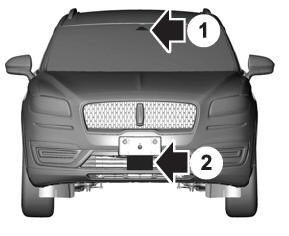
If a message regarding a blocked sensor or camera appears in the information display, something is obstructing the radar signals or camera images. The radar sensor is behind the fascia cover in the center of the lower grille. With a blocked sensor or camera, the system may not function, or performance may reduce. See Pre-Collision Assist – Information Messages.

Copyright © 2026 www.linautilus.com