
Lincoln Nautilus: Visual Search / Instrument Panel
Lincoln Nautilus 2018-2026 Owners Manual / Visual Search / Instrument Panel
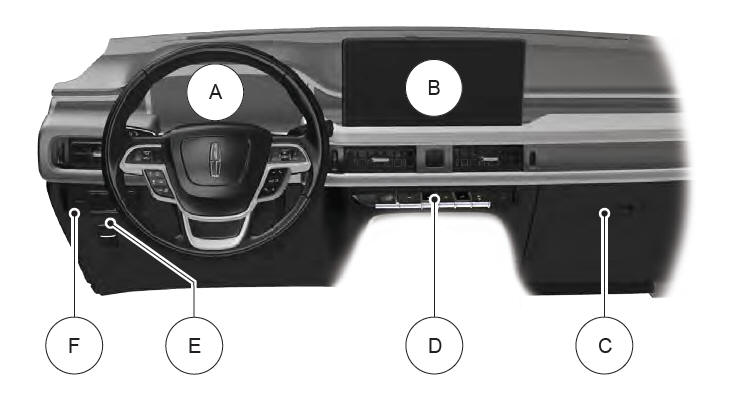
- See Instrument Cluster Overview.
- See Feature Bar.
- See Replacing the Cabin Air Filter.
- See Shifting Your Vehicle Into Gear.
- See Applying the Electric Parking Brake.
- See Exterior Lighting Control.
 Steering Wheel
See Adjusting the Volume.
See Beginning a Voice Interaction.
See Making and Receiving a Phone Call.
See Selecting the Audio Source.
See Accessing Navigation...
 Center Console
See Switching the Hazard Flashers On and Off.
See Switching the Audio Unit On and Off.
See Locating the Power Outlet.
See Switching the Heated Seats On and Off...
Other information:
Lincoln Nautilus 2018-2026 Owners Manual: Locating the Blind Spot Information System Sensors. Blind Spot Information System Indicators. Blind Spot Information System – Troubleshooting
Locating the Blind Spot Information System Sensors The sensors are behind the rear bumper on both sides of your vehicle. Note: Keep the sensors free from snow, ice and large accumulations of dirt. Note: Do not cover the sensors with bumper stickers, repair compound or other objects...
Lincoln Nautilus 2018-2026 Owners Manual: Locating the Pre-Collision Assist Sensors
Camera. Radar sensor (if equipped). If a message regarding a blocked sensor or camera appears in the information display, something is obstructing the radar signals or camera images. The radar sensor is behind the fascia cover in the center of the lower grille...
Categories
- Manuals Home
- 1st Generation Nautilus Owners Manual
- 1st Generation Nautilus Service Manual
- Switching the Lane Keeping System On and Off. Switching the Lane Keeping System Mode
- Child Safety Locks
- Programming the Garage Door Opener to Your Garage Door Opener Motor
- New on site
- Most important about car
Changing a Flat Tire
WARNING: If the tire pressure monitor sensor becomes damaged it may not function.
Note: The use of tire sealant may damage your tire pressure monitoring system and should only be used in roadside emergencies. If you must use a sealant, use the Tire Mobility Kit sealant. Replace the tire pressure monitoring system sensor and valve stem on the wheel by an authorized dealer after use of the sealant.
Note: The tire pressure monitoring system indicator light will illuminate when the spare tire is in use. To restore the full function of the monitoring system, all road wheels equipped with tire pressure monitoring sensors must be mounted on the vehicle.
If you get a flat tire while driving, do not apply the brake hea

Copyright © 2026 www.linautilus.com