
Lincoln Nautilus: Exterior Mirrors / Adjusting the Exterior Mirrors
Lincoln Nautilus 2018-2026 Owners Manual / Exterior Mirrors / Adjusting the Exterior Mirrors
WARNING: Do not adjust the mirrors when your vehicle is moving. This could result in the loss of control of your vehicle, serious personal injury or death.
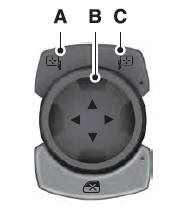
- Left-hand mirror.
- Adjustment control.
- Right-hand mirror.
To adjust your mirrors, switch your vehicle on, with the ignition in accessory mode or the engine running and then:
- Select the mirror you want to adjust. The control light turns on.
- Use the adjustment control to adjust the position of the mirror.
- Press the mirror control again. The control light turns off.

 Folding the Exterior Mirrors - Vehicles With: Manual Folding Mirrors. Folding the Exterior Mirrors - Vehicles With: Power Folding Mirrors
Folding the Exterior Mirrors - Vehicles With: Manual Folding Mirrors
Push the mirror toward the door window
glass.
Make sure that you fully engage the mirror
in its support when returning it to its original
position...
Other information:
Lincoln Nautilus 2018-2026 Owners Manual: Normal Scheduled Maintenance
Oil Change Reminder Your vehicle comes with an oil change reminder that determines when you should change the engine oil based on how you use your vehicle. Your vehicle lets you know when an oil change is due by displaying a message in the information display...
Lincoln Nautilus 2018-2026 Owners Manual: What Is the Tire Sealant and Inflator Kit. Tire Sealant and Inflator Kit Precautions
What Is the Tire Sealant and Inflator Kit Tire Inflator and Sealant Kit The kit consists of an air compressor to re-inflate the tire and a canister of sealing compound that will effectively seal most punctures. This kit will provide a temporary tire repair allowing you to drive your vehicle up to 120 mi (200 km) at a maximum speed of 50 mph (80 km/h) to reach a tire service location...
Categories
- Manuals Home
- 1st Generation Nautilus Owners Manual
- 1st Generation Nautilus Service Manual
- Interior Lamp Function. Adjusting the Instrument Panel Lighting Brightness. Ambient Lighting. Interior Lighting – Troubleshooting
- Programming the Garage Door Opener to Your Garage Door Opener Motor
- Engine Oil Capacity and Specification - 2.0L
- New on site
- Most important about car
Locating the Pre-Collision Assist Sensors
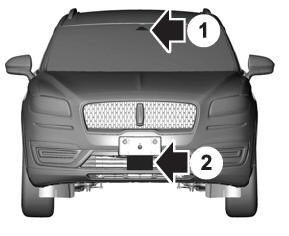
If a message regarding a blocked sensor or camera appears in the information display, something is obstructing the radar signals or camera images. The radar sensor is behind the fascia cover in the center of the lower grille. With a blocked sensor or camera, the system may not function, or performance may reduce. See Pre-Collision Assist – Information Messages.

Copyright © 2026 www.linautilus.com