
Lincoln Nautilus: Storing Your Vehicle / Removing Your Vehicle From Storage
Lincoln Nautilus 2018-2026 Owners Manual / Storing Your Vehicle / Removing Your Vehicle From Storage
When your vehicle is ready to come out of storage, do the following:
- We recommend that you change the engine oil before you use your vehicle again.
- Wash your vehicle to remove any dirt or grease film build-up on window surfaces.
- Check windshield wipers for any deterioration.
- Check under the hood for any foreign material that may have collected during storage such as mice or squirrel nests.
- Check the exhaust for any foreign material that may have collected during storage.
- Check tire pressures and set tire inflation per the Tire Label.
- Check brake pedal operation. Drive your vehicle 15 ft (4.5 m) back and forth to remove rust build-up.
- Check fluid levels (including coolant, oil and gas) to make sure there are no leaks, and fluids are at recommended levels.
- If you remove the battery, clean the battery cable ends and check for damage.
Contact an authorized dealer if you have any concerns or issues.
 Preparing Your Vehicle for Storage
If you plan on storing your vehicle for 30
days or more, the following maintenance
recommendations ensures your vehicle stays
in good operating condition...

Other information:
Lincoln Nautilus 2018-2026 Owners Manual: Venting the Moonroof. Moonroof Bounce-Back
Venting the Moonroof WARNING: Do not leave children unattended in your vehicle and do not let them play with the moonroof. Failure to follow this instruction could result in personal injury. The moonroof controls are on the overhead console. With the moonroof in the closed position, press and release the switch to vent the moonroof. To close the moonroof from the vent position, press and..
Lincoln Nautilus 2018-2026 Service Manual: Parking Brake - Component Location. Description and Operation
Item Description 1 Parking brake actuator motor (2 required) 2 ABS module 3 Parking brake switch ..
Categories
- Manuals Home
- 1st Generation Nautilus Owners Manual
- 1st Generation Nautilus Service Manual
- Power Outlet - Vehicles With: 110V Power Outlet
- Opening and Closing the Hood
- Switching the Lane Keeping System On and Off. Switching the Lane Keeping System Mode
- New on site
- Most important about car
Replacing the Rear Wiper Blades
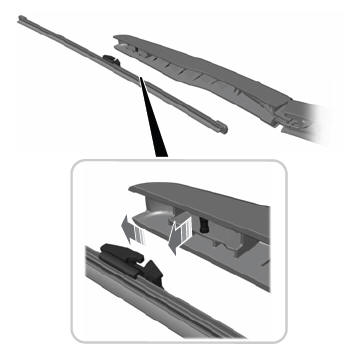
Note: Do not hold the wiper blade to lift the wiper arm.
Remove the wiper blade.
Copyright © 2026 www.linautilus.com