
Lincoln Nautilus: Liftgate / Setting the Liftgate Opening Height
Lincoln Nautilus 2018-2026 Owners Manual / Liftgate / Setting the Liftgate Opening Height
- Open the liftgate.
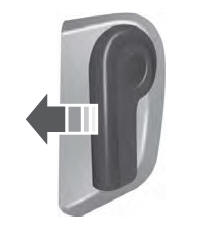
- Stop the liftgate movement by pressing
the control button on the liftgate when it
reaches the desired height.
Note: Once the liftgate stops moving, you can manually move it to the desired height.
- Press and hold the control button on the
liftgate until a tone sounds, indicating
programming is complete.
Note: You can only use the liftgate control button to program the height.
Note: You cannot program the height if the liftgate position is too low.
- The power liftgate now opens at the programmed height. To change the programmed height, repeat the steps.
Note: You can fully open the liftgate by manually pushing it upward to the maximum open position if it opens in a lower position.
Note: The system recalls the new programmed height until you reprogram it, even if you disconnect the battery.
 Opening the Liftgate
Opening the Liftgate From Inside Your Vehicle
With the transmission in park
(P),
press the button on the instrument
panel.
Note: Be careful when opening or closing
the liftgate in a garage or other enclosed
area to avoid damaging the liftgate...
 Closing the Liftgate
Closing the Liftgate From Inside Your Vehicle
WARNING: Make sure all persons
are clear of the power liftgate area before
using the power liftgate control...
Other information:
Lincoln Nautilus 2018-2026 Service Manual: Front Camber Adjustment. General Procedures
Special Tool(s) / General Equipment Wheel Alignment System Adjustment NOTICE: Suspension fasteners are critical parts that affect the performance of vital components and systems. Failure of these fasteners may result in major service expense...
Lincoln Nautilus 2018-2026 Service Manual: Front Door Alignment. General Procedures
Inspection NOTE: Removal steps in this procedure may contain installation details. NOTE: LH side shown, RH side similar. Inspect the front door-to-body dimensions. Refer to: Body and Frame (501-26 Body Repairs - Vehicle Specific Information and Tolerance Checks, Description and Operation)...
Categories
- Manuals Home
- 1st Generation Nautilus Owners Manual
- 1st Generation Nautilus Service Manual
- Opening the Liftgate
- Engine Oil Capacity and Specification - 2.0L
- Child Safety Locks
- New on site
- Most important about car
Opening and Closing the Hood
Opening the Hood

Copyright © 2026 www.linautilus.com