
Lincoln Nautilus: Cross Traffic Alert / Switching Cross Traffic Alert On and Off. Locating the Cross Traffic Alert Sensors. Cross Traffic Alert Indicators. Cross Traffic Alert – Troubleshooting
Switching Cross Traffic Alert On and Off
To switch cross traffic alert on or off use the instrument cluster display:
- Using the instrument cluster display controls on the steering wheel, select SETTINGS.
- Select Driver assistance.
- Switch Cross traffic alert on or off.
Locating the Cross Traffic Alert Sensors
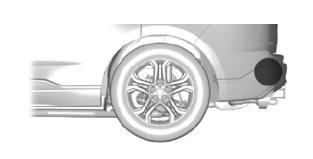
The sensors are behind the rear bumper on both sides of your vehicle.
Note: Keep the sensors free from snow, ice and large accumulations of dirt.
Note: Do not cover the sensors with bumper stickers, repair compound or other objects.
Note: Blocked sensors may affect system accuracy.
If something is blocking the sensors, a message may appear in the information display when you shift into reverse (R).
Cross Traffic Alert Indicators

When the cross traffic alert detects an approaching vehicle, a tone sounds, a warning lamp illuminates in the relevant exterior mirror and arrows appear in the information display to show which side the vehicle is approaching from.
If the system malfunctions, a warning lamp illuminates in the instrument cluster and a message appears in the information display. Have your vehicle checked as soon as possible.
Note: If arrows do not display, a message appears in the information display.
Note: In some conditions, the system could alert you, even when there is nothing in the detection zone, for example a vehicle passing further away from your vehicle.
 What Is Cross Traffic Alert? How Does Cross Traffic Alert Work? Cross Traffic Alert Precautions. Cross Traffic Alert Limitations.
What Is Cross Traffic Alert
The system alerts you of vehicles
approaching from the sides behind your
vehicle when you shift into reverse (R).
How Does Cross Traffic Alert Work
Cross Traffic Alert detects vehicles that
approach at a speed between 4–37 mph
(6–60 km/h)...
 Cross Traffic Alert – Troubleshooting
Cross Traffic Alert – Information Messages
..
Other information:
Lincoln Nautilus 2018-2025 Owners Manual: Switching the Hazard Flashers On and Off. Jump Starting the Vehicle
Switching the Hazard Flashers On and Off The hazard flasher button is on the instrument panel. Press the button to switch the hazard flashers on if your vehicle is creating a safety hazard for other road users. When you switch the hazard flashers on, all front and rear direction indicators flash. Note: The hazard flashers operate when the ignition is in any position, or if the key is not ..
Lincoln Nautilus 2018-2025 Service Manual: Blind Spot Information System - System Operation and Component Description. Description and Operation
System Operation BLIS ® and CTA System Diagram Item Description 1 LH exterior mirror 2 SODR 3 GWM 4 SCCM 5 IPC 6 PCM 7 SODL 8 DDM 9 PDM 10 BCM 11 PAM 12 LH BLIS ®/ CTA LED 13 RH exterior mirror 14 RH BLIS ®/ CTA ..
Categories
- Manuals Home
- 1st Generation Nautilus Owners Manual
- 1st Generation Nautilus Service Manual
- Interior Lamp Function. Adjusting the Instrument Panel Lighting Brightness. Ambient Lighting. Interior Lighting – Troubleshooting
- Anti-Theft Alarm System Settings. Security – Troubleshooting
- Changing the 12V Battery
- New on site
- Most important about car
Locating the Pre-Collision Assist Sensors
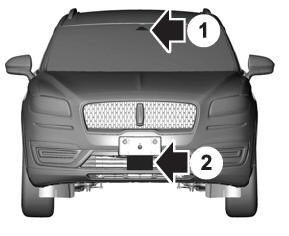
If a message regarding a blocked sensor or camera appears in the information display, something is obstructing the radar signals or camera images. The radar sensor is behind the fascia cover in the center of the lower grille. With a blocked sensor or camera, the system may not function, or performance may reduce. See Pre-Collision Assist – Information Messages.
