
Lincoln Nautilus: Customer Information
Lincoln Nautilus 2018-2026 Owners Manual / Customer Information
- Rollover Warning. The Better Business Bureau Auto Line Program
- The Mediation and Arbitration Program. Ordering a Canadian French Owner's Manual. Reporting Safety Defects in the United States
- Reporting Safety Defects in Canada
- Declaration of Conformity
- Radio Frequency Certification Labels
- California Proposition 65. Perchlorate. Replacement Parts Recommendation. Mobile Communications Equipment
- End User License Agreement
- Emission Law
 Special Operating Conditions Scheduled Maintenance
If you operate your vehicle primarily in any
of the following conditions, you need to
perform extra maintenance as indicated. If
you operate your vehicle occasionally under
any of these conditions, it is not necessary
to perform the extra maintenance...
 Rollover Warning. The Better Business Bureau Auto Line Program
Rollover Warning
WARNING: Utility vehicles have a
significantly higher rollover rate than other
types of vehicles.
WARNING: Vehicles with a higher
center of gravity (utility and four-wheel
drive vehicles) handle differently than
vehicles with a lower center of gravity
(passenger cars)...
Other information:
Lincoln Nautilus 2018-2026 Service Manual: Wipers and Washers - System Operation and Component Description. Description and Operation
System Operation System Diagram Item Description 1 HS3-CAN 2 LIN 3 Wiper/Washer Switch 4 Rain Sensor 5 Washer Motor 6 SCCM 7 Windshield Wiper Motor 8 HS2-CAN 9 GWM 10 BCM 11 IPC 12 HS-CAN 1 13 PCM 14 BJB 15 Wiper Relay 16 BJB 17 Rear Window Washer Relay 18 Headlamp Washe..
Lincoln Nautilus 2018-2026 Service Manual: Horn - System Operation and Component Description. Description and Operation
System Operation System Diagram- Vehicles Without Active Steering Item Description 1 BCM 2 Horn 3 Clockspring 4 SCCM 5 Horn switch Horn Operation - Vehicles Without Active Steering The horn switch consists of 2 sets of contacts separated by springs. The lower set is connected to ground and the upper set is connected to the horn signal..
Categories
- Manuals Home
- 1st Generation Nautilus Owners Manual
- 1st Generation Nautilus Service Manual
- Locating the Pre-Collision Assist Sensors
- Drive Mode Control
- Opening and Closing the Hood
- New on site
- Most important about car
Replacing the Rear Wiper Blades
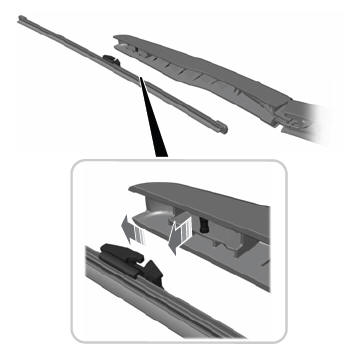
Note: Do not hold the wiper blade to lift the wiper arm.
Remove the wiper blade.
Copyright © 2026 www.linautilus.com