
Lincoln Nautilus: Voltage Converter/Inverter / Direct Current/Alternating Current (DC/AC) Inverter - Overview. Description and Operation
Lincoln Nautilus 2018-2026 Service Manual / Electrical / Battery and Charging System / Voltage Converter/Inverter / Direct Current/Alternating Current (DC/AC) Inverter - Overview. Description and Operation
Overview
The direct current/alternating current (DC/AC) inverter converts 12 volts DC to 110 volts AC to power AC devices rated 150 watts or less.
 Direct Current/Alternating Current (DC/AC) Inverter - Component Location. Description and Operation
..
 Direct Current/Alternating Current (DC/AC) Inverter - System Operation and Component Description. Description and Operation
System Diagram
Item
Description
1
PCM
2
BCM
3
Direct Current/Alternating Current (DC/AC) Inverter
4
A/C Power Outlet Socket
System Operation
Network Message Chart
Broadcast Message
Originating Module
Message Purpose
Power pack torque status
PCM
Used to dete..
Other information:
Lincoln Nautilus 2018-2026 Service Manual: Rear Floor Panel Section. Removal and Installation
Special Tool(s) / General Equipment Spherical Cutter Grinder Air Body Saw MIG/MAG Welding Equipment Spot Weld Drill Bit Materials Name Specification Flange SealantCU7Z-19B508-A WSS-M2G348-A11 Removal Restore vehicle to pre-accident dimensions, if required. Refer to: Body and Frame (501-26 Body Repairs - Vehicle Specific Information and T..
Lincoln Nautilus 2018-2026 Owners Manual: Switching Stability Control On and Off. Stability Control Indicator. Stability Control – Troubleshooting
Switching Stability Control On and Off The system turns on each time you switch the ignition on. You can switch the electronic stability control system off by pressing and holding the ESC off button for over 15 seconds, or you can press the button again to switch the system on. Shifting the transmission into reverse (R) disables the system. You can switch the traction control system off or..
Categories
- Manuals Home
- 1st Generation Nautilus Owners Manual
- 1st Generation Nautilus Service Manual
- Normal Scheduled Maintenance
- Opening and Closing the Hood
- Power Outlet - Vehicles With: 110V Power Outlet
- New on site
- Most important about car
Locating the Pre-Collision Assist Sensors
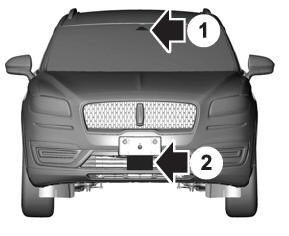
If a message regarding a blocked sensor or camera appears in the information display, something is obstructing the radar signals or camera images. The radar sensor is behind the fascia cover in the center of the lower grille. With a blocked sensor or camera, the system may not function, or performance may reduce. See Pre-Collision Assist – Information Messages.

Copyright © 2026 www.linautilus.com