Lincoln Nautilus: Airbags / How Do The Side Airbags Work
WARNING: Do not place objects or mount equipment on or near the airbag cover, on the side of the front or rear seatbacks, or in areas that may come into contact with a deploying airbag. Failure to follow these instructions may increase the risk of personal injury in the event of a crash.
WARNING: Do not use accessory seat covers. The use of accessory seat covers may prevent the deployment of the side airbags and increase the risk of injury in an accident.
WARNING: Do not lean your head on the door. The side airbag could injure you as it deploys from the side of the seatback.
The side airbags are on the outermost side of the seat backrests of the front seats. In certain sideways crashes or rollovers, the airbags will be inflated. The airbag was designed to inflate between the door panel and occupant to further enhance the protection provided occupants in side impact crashes.
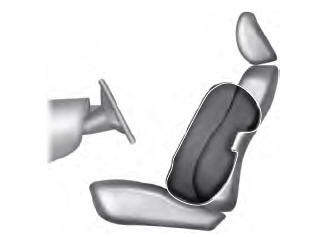
The system consists of the following:
- A label or embossed side panel indicating that side airbags are fitted to your vehicle.
- Side airbags inside the driver and front passenger seat backrests.
- Crash sensors and monitoring system with readiness indicator.
 How Do the Front Airbags Work
The driver and front passenger airbags
deploy during significant frontal and near
frontal crashes.
The driver and passenger front airbag system
consists of:
Driver and passenger airbag modules...
 How Do The Knee Airbags Work. How Does The Safety Canopy™ Work
How Do The Knee Airbags Work
WARNING: Close the glove box door
when your vehicle is moving. Failure to
follow this instruction could reduce the
effectiveness of the passenger knee airbag
and increase the risk of injury in a crash...
Other information:
Lincoln Nautilus 2018-2026 Service Manual: Charging System - 2.0L EcoBoost (184kW/250PS) – MI4. Diagnosis and Testing
Inspection and Verification Verify the customer concern by operating the charging system. Before diagnosing or repairing the charging system inspect the following items: Check the battery for loose, damaged or corroded connections...
Lincoln Nautilus 2018-2026 Owners Manual: Data Privacy
WARNING: Do not connect wireless plug-in devices to the data link connector. Unauthorized third parties could gain access to vehicle data and impair the performance of safety related systems. Only allow repair facilities that follow our service and repair instructions to connect their equipment to the data link connector...
Categories
- Manuals Home
- 1st Generation Nautilus Owners Manual
- 1st Generation Nautilus Service Manual
- Auto-Start-Stop
- Massage Seats
- Folding the Exterior Mirrors - Vehicles With: Manual Folding Mirrors. Folding the Exterior Mirrors - Vehicles With: Power Folding Mirrors
- New on site
- Most important about car
Programming the Garage Door Opener to Your Garage Door Opener Motor