
Lincoln Nautilus: Lane Keeping System / Image Processing Module A (IPMA). Removal and Installation
Removal
NOTE: Removal steps in this procedure may contain installation details.
-
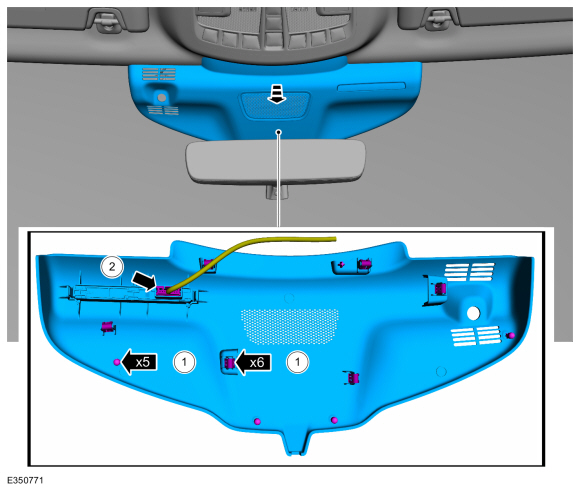
Remove the IPMA cover.
-
Release the tabs and clips from the IPMA cover.
-
Disconnect the wiring harness electrical connector and remove the IPMA cover.
-
Release the tabs and clips from the IPMA cover.
 |
-
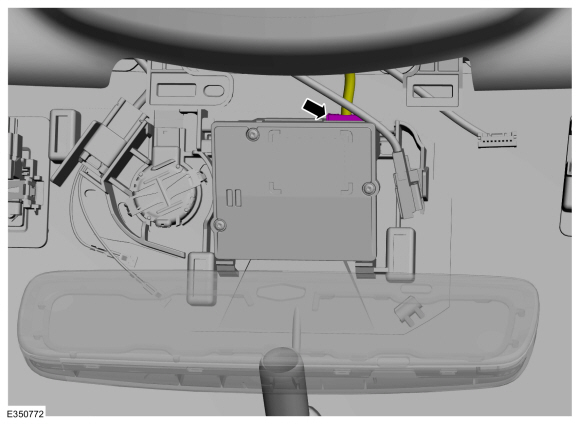
Disconnect the electrical connector.
 |
-
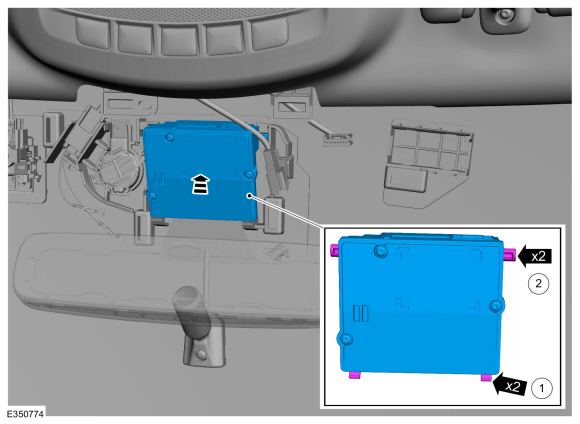
Remove the IPMA .
-
Remove the upper tabs.
-
Remove the lower tabs.
-
Remove the upper tabs.
.jpg) |
Installation
-
Install the IPMA .
-
Install the lower tabs.
-
Install the upper tabs.
-
Install the lower tabs.
 |
-
To install, reverse the removal procedure.
-
NOTE: This step is only necessary when installing a new component.
-
If a new IPMA has been installed, using a diagnostic scan tool,
complete the PMI process for the IPMA following the on-screen
instructions.
-
If a new IPMA has been installed, carry out the camera alignment using a scan tool.
-
If a new IPMA has been installed, using a diagnostic scan tool,
complete the PMI process for the IPMA following the on-screen
instructions.
 Lane Keeping System. Diagnosis and Testing
DTC Chart(s)
Diagnostics in this manual assume a certain skill level and knowledge of Ford-specific diagnostic practices. REFER to: Diagnostic Methods (100-00 General Information, Description and Operation)...

Other information:
Lincoln Nautilus 2018-2026 Service Manual: About this Manual. Description and Operation
Introduction WARNING: Before beginning any service procedure in this manual, refer to health and safety warnings in section 100-00 General Information. Failure to follow this instruction may result in serious personal injury. For additional information, refer to: Health and Safety Precautions (100-00 General Information, Description and Operation). This manual describes and..
Lincoln Nautilus 2018-2026 Service Manual: Speaker Audio Test. General Procedures
Activation NOTE: The procedure used to download the audio files varies, depending on the web browser used. Using a suitable web browser, download all of the diagnostic sound tracks to a suitable USB drive. 125Hz Sample 100Hz Sample 80Hz Sample 63Hz Sample 50Hz Sample 40Hz Sample ..
Categories
- Manuals Home
- 1st Generation Nautilus Owners Manual
- 1st Generation Nautilus Service Manual
- USB Ports
- Normal Scheduled Maintenance
- Locating the Pre-Collision Assist Sensors
- New on site
- Most important about car
Traction Control
How Does Traction Control Work
If your vehicle begins to slide, the system applies the brakes to individual wheels and, when needed, reduces power at the same time. If the wheels spin when accelerating on slippery or loose surfaces, the system reduces power in order to increase traction.
Switching Traction Control On and Off
WARNING: The stability and traction control light illuminates steadily if the system detects a failure. Make sure you did not manually disable the traction control system using the information display controls or the switch. If the stability control and traction control light is still illuminating steadily, have the system serviced by an authorized dealer immediately. Operating your vehicle with the traction co
