Lincoln Nautilus: Parking Aids / Rear Parking Aid
What is the Rear Parking Aid
Rear parking sensors detect objects behind your vehicle when in reverse (R).
Rear Parking Aid Limitations
There is a decreased coverage area at the outer corners.
When using a programmed MyKey, you cannot switch the rear parking aid off.
The rear parking aid sensors are active when your vehicle is in reverse (R) and the vehicle speed is less than 3 mph (5 km/h).
The sensor coverage area is up to 71 in (180 cm) from the rear bumper.
The rear parking aid detects large objects when you shift into reverse (R) and any of the following occur:
Your vehicle is moving backward at a low speed.
Your vehicle is stationary but an object is approaching the rear of your vehicle at a low speed.
Your vehicle is moving backward at a low speed and an object is moving towards your vehicle, for example another vehicle at a low speed.
Locating the Rear Parking Aid Sensors
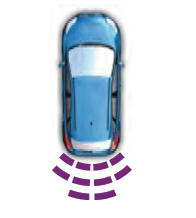
The rear parking aid sensors are in the rear bumper.
Rear Parking Aid Audible Warnings
A warning tone sounds when your vehicle approaches an object. As your vehicle moves closer to an object, the rate of the tone increases. The warning tone continuously sounds when an object is 12 in (30 cm) or less from the rear bumper.
If your vehicle remains stationary for a few seconds, the audible warning turns off. If your vehicle moves backward the tone sounds again.
Note: When the parking aid system sounds a tone, the audio system could reduce the set volume.
 Parking Aid Precautions. Switching Parking Aid On and Off
Parking Aid Precautions
WARNING: To help avoid personal
injury, always use caution when in reverse
(R) and when using the sensing system.
WARNING: The system may not
detect objects with surfaces that absorb
reflection...
 Front Parking Aid
What is the Front Parking Aid
Front parking sensors detect objects in front
of your vehicle.
Front Parking Aid Limitations
The front parking aid sensors are active
when your vehicle is in any position other
than park (P) and the vehicle speed is less
than 5 mph (8 km/h)...
Other information:
Lincoln Nautilus 2018-2026 Owners Manual: Setting the Liftgate Opening Height
Open the liftgate. Stop the liftgate movement by pressing the control button on the liftgate when it reaches the desired height.Note: Once the liftgate stops moving, you can manually move it to the desired height. Press and hold the control button on the liftgate until a tone sounds, indicating programming is complete...
Lincoln Nautilus 2018-2026 Service Manual: Direct Current/Alternating Current (DC/AC) Inverter. Diagnosis and Testing
Inspection and Verification Before diagnosing or repairing the Direct Current/Alternating Current (DC/AC) Inverter system refer to the Owner's Literature and REFER to: Direct Current/Alternating Current (DC/AC) Inverter - System Operation and Component Description (414-05 Voltage Converter/Inverter, Description and Operation)...
Categories
- Manuals Home
- 1st Generation Nautilus Owners Manual
- 1st Generation Nautilus Service Manual
- Folding the Exterior Mirrors - Vehicles With: Manual Folding Mirrors. Folding the Exterior Mirrors - Vehicles With: Power Folding Mirrors
- Locating the Pre-Collision Assist Sensors
- Programming the Garage Door Opener to Your Garage Door Opener Motor
- New on site
- Most important about car
Programming the Garage Door Opener to Your Garage Door Opener Motor