
Lincoln Nautilus: Parking Aids / Front Parking Aid
What is the Front Parking Aid
Front parking sensors detect objects in front of your vehicle.
Front Parking Aid Limitations
The front parking aid sensors are active when your vehicle is in any position other than park (P) and the vehicle speed is less than 5 mph (8 km/h).
The sensor coverage area is up to 28 in (70 cm) from the bumper.
If your vehicle is in reverse (R), the front parking aid detects objects when your vehicle is moving at a low speed or an object is moving toward your vehicle and provides an audio warning, for example another vehicle at a low speed. Once your vehicle reaches a stop, the audio warning stops after a few seconds. Visual indication is always active in reverse (R).
If your vehicle is in any forward gear, the front parking aid provides audible warnings and visual indication when your vehicle is moving at a speed of 5 mph (8 km/h) or below and the system detects an object within the detection zone. Once your vehicle reaches a stop, the visual indication and audio warning stops after a few seconds.
If your vehicle is in neutral (N), the front and rear sensors provide visual indication only when your vehicle is moving below a speed of 5 mph (8 km/h) and obstacles are detected inside the detection areas. Once your vehicle stops, the visual indication and audio warning stops after a few seconds.
Locating the Front Parking Aid Sensors
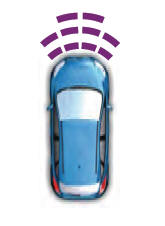
The front parking aid sensors are in the front bumper.
Front Parking Aid Audible Warnings
A warning tone sounds when there is an object within 28 in (70 cm) from the front bumper. As your vehicle moves closer to an object, the rate of the tone increases.
The warning tone continuously sounds when an object is 12 in (30 cm) or less from the front bumper.
Note: If the detected object is 12 in (30 cm) or less from your vehicle, visual indication remains on.
 Rear Parking Aid
What is the Rear Parking Aid
Rear parking sensors detect objects behind
your vehicle when in reverse (R).
Rear Parking Aid Limitations
There is a decreased coverage area at the
outer corners...
 Side Parking Aid
What is the Side Parking Aid
The front and rear outermost parking aid
sensors map objects that are near to the
sides of your vehicle.
Side Parking Aid Limitations
The sensor coverage is up to 24 in (60 cm)
from the sides of your vehicle...
Other information:
Lincoln Nautilus 2018-2026 Service Manual: Controller Area Network (CAN) Module Communications Network. Diagnosis and Testing
Diagnostic Trouble Code (DTC) Chart Diagnostics in this manual assume a certain skill level and knowledge of Ford-specific diagnostic practices. REFER to: Diagnostic Methods (100-00 General Information, Description and Operation). Module DTC Description Action GWM U0001:09 High Speed CAN Communication Bus: Component Failures GO to Pinpoint Test AR GWM U0214:00 Lost Commun..
Lincoln Nautilus 2018-2026 Owners Manual: Roadside Assistance
Vehicles sold in the United States: Getting Roadside Assistance To fully assist you should you have a vehicle concern, Lincoln Motor Company offers a complimentary roadside assistance program. This program is separate from the New Vehicle Limited Warranty. The service is available: Throughout the life of the vehicle for original owners. For six years or 70,000 mi (110,000 km), whichever..
Categories
- Manuals Home
- 1st Generation Nautilus Owners Manual
- 1st Generation Nautilus Service Manual
- Child Safety Locks
- Power Outlet - Vehicles With: 110V Power Outlet
- Replacing the Rear Wiper Blades
- New on site
- Most important about car
Parking Aid Indicators. Parking Aids – Troubleshooting
Parking Aid Indicators
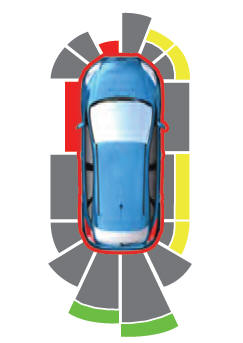
The system provides object distance indication through the information and entertainment display.
As the distance to the object decreases, the indicator waves and the lines move toward the vehicle icon. If there is no object detected, the distance indicator lines are grey.