
Lincoln Nautilus: Exterior Lighting / High Mounted Stoplamp. Removal and Installation
Lincoln Nautilus 2018-2026 Service Manual / Electrical / Lighting / Exterior Lighting / High Mounted Stoplamp. Removal and Installation
Removal
-
Remove the rear spoiler.
Refer to: Rear Spoiler (501-08 Exterior Trim and Ornamentation, Removal and Installation).
-
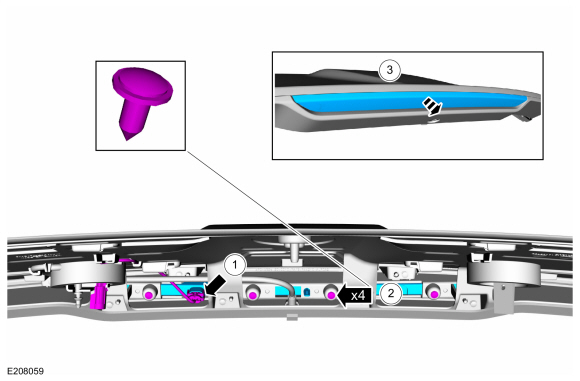
Remove the high mounted stoplamp.
-
Disconnect the high mounted stoplamp electrical connector.
-
Remove the retainers.
-
Separate the high mounted stoplamp from the rear spoiler.
-
Disconnect the high mounted stoplamp electrical connector.
 |
Installation
-
To install, reverse the removal procedure.
 Headlamp Switch. Removal and Installation
Removal
Detach the clips and pivot the instrument panel LH lower trim panel downward.
Remove the headlamp switch...
 Light Emitting Diode (LED) Control Module. Removal and Installation
Removal
Remove the headlamp assembly.
Refer to: Headlamps (417-01 Exterior Lighting)
.
Remove the screws and the LED control module...
Other information:
Lincoln Nautilus 2018-2026 Service Manual: Spring. Removal and Installation
Special Tool(s) / General Equipment Spring Compressor Vise Removal NOTICE: Suspension fasteners are critical parts that affect the performance of vital components and systems. Failure of these fasteners may result in major service expense...
Lincoln Nautilus 2018-2026 Owners Manual: Cleaning the Interior
Cleaning the Instrument Panel WARNING: Do not use chemical solvents or strong detergents when cleaning the steering wheel or instrument panel to avoid contamination of the airbag system. We recommend that you only clean the instrument panel and cluster lens with a damp soft cloth...
Categories
- Manuals Home
- 1st Generation Nautilus Owners Manual
- 1st Generation Nautilus Service Manual
- Auto Hold
- Locating the Pre-Collision Assist Sensors
- Auto-Start-Stop
- New on site
- Most important about car
Opening and Closing the Hood
Opening the Hood

Copyright © 2026 www.linautilus.com