
Lincoln Nautilus: Parking Aids
Lincoln Nautilus 2018-2026 Owners Manual / Parking Aids
- Parking Aid Precautions. Switching Parking Aid On and Off
- Rear Parking Aid
- Front Parking Aid
- Side Parking Aid
- Parking Aid Indicators. Parking Aids – Troubleshooting
 Steering
Electric Power Steering
Electric Power Steering Precautions
WARNING: The electric power
steering system has diagnostic checks that
continuously monitor the system...
 Parking Aid Precautions. Switching Parking Aid On and Off
Parking Aid Precautions
WARNING: To help avoid personal
injury, always use caution when in reverse
(R) and when using the sensing system.
WARNING: The system may not
detect objects with surfaces that absorb
reflection...
Other information:
Lincoln Nautilus 2018-2026 Service Manual: Side Obstacle Detection Control Module (SODCM). Removal and Installation
Removal Side obstacle detection control module NOTE: This step is only necessary if the SODL or SODR is being replaced. NOTE: LH side is shown, RH side is similar. Using a diagnostic scan tool, begin the PMI process for the SODL or SODR following the on-screen instructions...
Lincoln Nautilus 2018-2026 Owners Manual: Manual Seats
Head Restraint Components Rear Seat Outermost Head Restraints The head restraints consist of: An energy absorbing head restraint. Two steel stems. Guide sleeve unlock and remove buttons. Fold button. Rear Seat Center Head Restraint The head restraint consists of: An energy absorbing head restraint...
Categories
- Manuals Home
- 1st Generation Nautilus Owners Manual
- 1st Generation Nautilus Service Manual
- USB Ports
- Massage Seats
- Interior Lamp Function. Adjusting the Instrument Panel Lighting Brightness. Ambient Lighting. Interior Lighting – Troubleshooting
- New on site
- Most important about car
Locating the Pre-Collision Assist Sensors
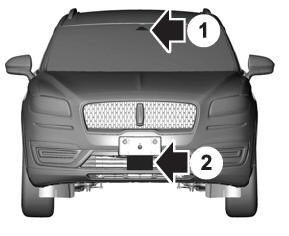
If a message regarding a blocked sensor or camera appears in the information display, something is obstructing the radar signals or camera images. The radar sensor is behind the fascia cover in the center of the lower grille. With a blocked sensor or camera, the system may not function, or performance may reduce. See Pre-Collision Assist – Information Messages.

Copyright © 2026 www.linautilus.com