
Lincoln Nautilus: Steering Wheel
Lincoln Nautilus 2018-2026 Owners Manual / Steering Wheel
- Adjusting the Steering Wheel - Vehicles With: Manual Adjustable Steering Column
- Adjusting the Steering Wheel - Vehicles With: Power Adjustable Steering Column
- Horn. Resetting the Stopping Position - Vehicles With: Power Adjustable Steering Column. Switching the Heated Steering Wheel On and Off
 Anti-Theft Alarm System Settings. Security – Troubleshooting
Anti-Theft Alarm System Settings
What are the Alarm Security Levels
You can select two levels of alarm security,
all sensors and perimeter sensing.
All Sensors
All sensors is the standard setting...
 Adjusting the Steering Wheel - Vehicles With: Manual Adjustable Steering
Column
Adjusting the Steering Wheel - Vehicles With: Manual Adjustable Steering
Column
Manual Adjustable Steering Column
WARNING: Do not adjust the steering
wheel when your vehicle is moving.
Note: Make sure that you are sitting in the
correct position...
Other information:
Lincoln Nautilus 2018-2026 Service Manual: Headliner. Removal and Installation
Special Tool(s) / General Equipment Interior Trim Remover Materials Name Specification 3M™ Super-Fast Repair Adhesive04747 - Removal Remove the following items: On both sides. Remove the A-pillar trim panels...
Lincoln Nautilus 2018-2026 Owners Manual: Replacing the Rear Wiper Blades
Lift the wiper arm.Note: Do not hold the wiper blade to lift the wiper arm. Remove the wiper blade.Note: Make sure that the wiper arm does not spring back against the glass when the wiper blade is not attached. To install, reverse the removal procedure...
Categories
- Manuals Home
- 1st Generation Nautilus Owners Manual
- 1st Generation Nautilus Service Manual
- Opening and Closing the Hood
- Power Outlet - Vehicles With: 110V Power Outlet
- Engine Oil Capacity and Specification - 2.0L
- New on site
- Most important about car
Locating the Pre-Collision Assist Sensors
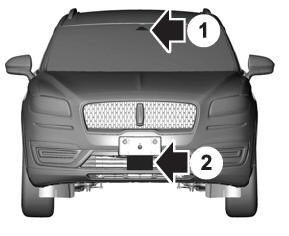
If a message regarding a blocked sensor or camera appears in the information display, something is obstructing the radar signals or camera images. The radar sensor is behind the fascia cover in the center of the lower grille. With a blocked sensor or camera, the system may not function, or performance may reduce. See Pre-Collision Assist – Information Messages.

Copyright © 2026 www.linautilus.com