
Lincoln Nautilus: Vehicle Identification
Lincoln Nautilus 2018-2026 Owners Manual / Vehicle Identification
Locating the Vehicle Identification Number
The vehicle identification number is located on the left-hand side of the instrument panel.
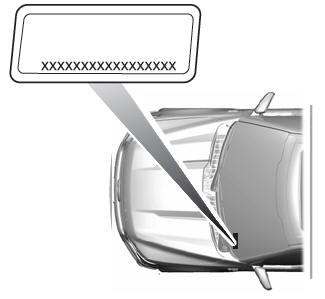
In the graphic, XXXX is representative of your vehicle identification number.
Vehicle Identification Number Overview
The vehicle identification number contains the following information:
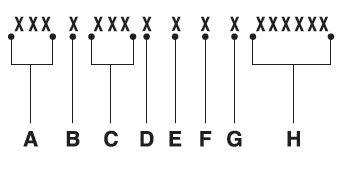
- World manufacturer identifier.
- Brake system, gross vehicle weight rating, restraint devices and their locations.
- Make, vehicle line, series, body type.
- Engine or motor type.
- Check digit.
- Model year.
- Assembly plant.
- Production sequence number.
 Brake Fluid Specification
Use fluid that meets the defined specification
and viscosity grade.
If you do not use fluid that meets the defined
specification and viscosity grade, it could
result in:
Component damage that your vehicle
warranty does not cover...
 Connected Vehicle
What Is a Connected Vehicle
A connected vehicle has technology that
allows your vehicle to connect to a mobile
network and for you to access a range of
features...
Other information:
Lincoln Nautilus 2018-2026 Owners Manual: Manual Park Release
What Is Manual Park Release Manual park release allows you to move your transmission out of the park (P) position in the event of an electrical malfunction or emergency. Manual Park Release Precautions WARNING: When doing this procedure, you need to take the transmission out of park (P) which means your vehicle can roll freely...
Lincoln Nautilus 2018-2026 Owners Manual: Connecting Your Phone. Phone Menu
Connecting Your Phone Go to the settings menu on your cell phone and switch Bluetooth on. Select the phone option on the feature bar. Select Add Phone.Note: A prompt alerts you to search for your vehicle on your cell phone. Select your vehicle on your cell phone...
Categories
- Manuals Home
- 1st Generation Nautilus Owners Manual
- 1st Generation Nautilus Service Manual
- Programming the Garage Door Opener to Your Garage Door Opener Motor
- Child Safety Locks
- Interior Lamp Function. Adjusting the Instrument Panel Lighting Brightness. Ambient Lighting. Interior Lighting – Troubleshooting
- New on site
- Most important about car
Programming the Garage Door Opener to Your Garage Door Opener Motor

Copyright © 2026 www.linautilus.com