
Lincoln Nautilus: Hydraulic Brake Actuation / Brake Master Cylinder. Removal and Installation
Removal
NOTICE: Do not spill brake fluid on painted or plastic surfaces or damage to the surface may occur. If brake fluid is spilled onto a painted or plastic surface, immediately wash the surface with water.
NOTE: Removal steps in this procedure may contain installation details.
-
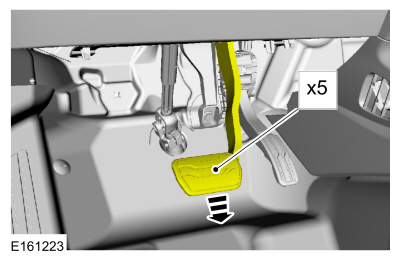
NOTICE: Before removing the master cylinder, relieve the vacuum in the brake booster or the master cylinder O-ring seal may be drawn into the brake booster, causing brake booster failure and increased brake pedal effort.
Fully apply and release the brake pedal 5 times.
 |
-
Remove the battery.
Refer to: Battery (414-01 Battery, Mounting and Cables, Removal and Installation).
-
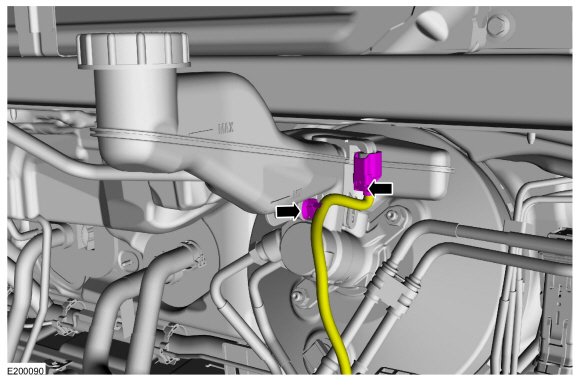
Disconnect the brake fluid level sensor electrical connector and detach the wiring retainer.
 |
-
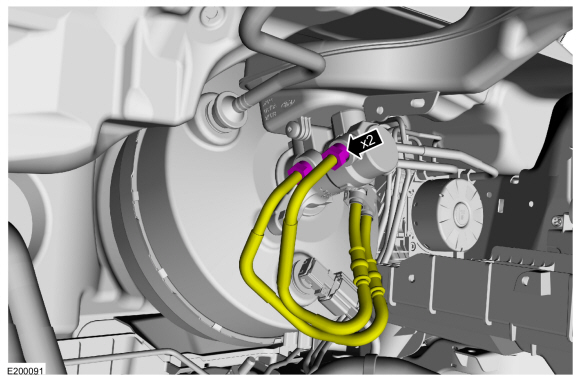
Disconnect the brake tube fittings.
Torque: 20 lb.ft (27.5 Nm)
 |
-
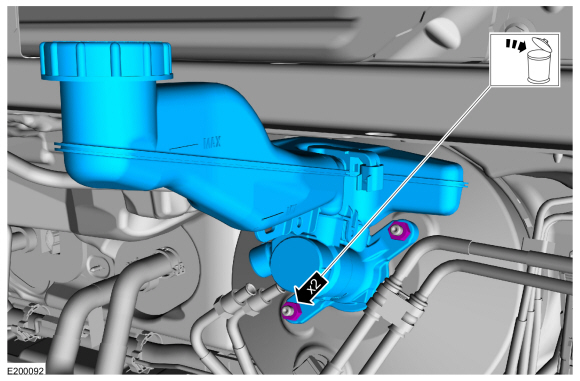
Remove the nuts and the brake master cylinder. Discard the nuts.
Torque: 20 lb.ft (27.6 Nm)
 |
-
Make sure that the master cylinder-to-booster seal is removed with the master cylinder.
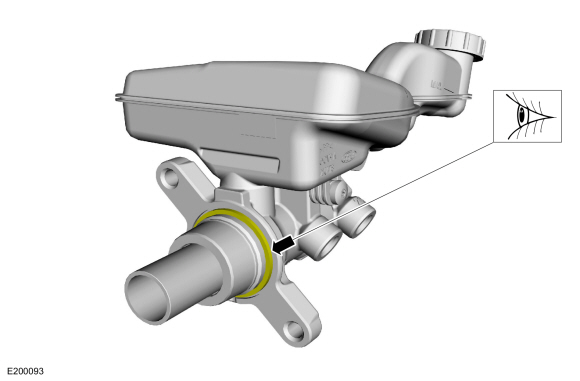 |
Installation
-
To install, reverse the removal procedure.
-
-
If a new brake master cylinder has been installed, bleed the master cylinder.
Refer to: Component Bleeding (206-00 Brake System - General Information, General Procedures).
-
If the brake master cylinder was removed to access other components, bleed the brake system.
Refer to: Brake System Pressure Bleeding (206-00 Brake System - General Information, General Procedures).
-
If a new brake master cylinder has been installed, bleed the master cylinder.
 Brake Fluid Reservoir. Removal and Installation
Materials
Name
Specification
Motorcraft® DOT 4 LV High Performance Motor Vehicle Brake FluidPM-20
WSS-M6C65-A2
Removal
NOTICE:
Do not spill brake fluid on painted or plastic surfaces or
damage to the surface may occur...
 Brake Pedal and Bracket. Removal and Installation
Removal
NOTE:
Removal steps in this procedure may contain installation details.
Remove the nuts, disconnect the electrical connector and remove the LH insulator panel...
Other information:
Lincoln Nautilus 2018-2026 Service Manual: Crankshaft End Play. General Procedures
General Equipment Dial indicator Dial indicator fixture NOTE: Refer to the appropriate Section 303-01 for the specification. Position the crankshaft to the rear of the cylinder block. Zero the Dial Indicator Gauge with Holding Fixture...
Lincoln Nautilus 2018-2026 Service Manual: Driveshaft Angle Measurement. General Procedures
Check NOTE: This procedure does not apply to CV joints, flex couplers or double cardan joints that are used in some driveshafts. This check is for single-cross and roller-style joints found in the driveshafts. NOTE: Prior to checking driveline angularity, inspect the U-joints for correct operation...
Categories
- Manuals Home
- 1st Generation Nautilus Owners Manual
- 1st Generation Nautilus Service Manual
- Folding the Exterior Mirrors - Vehicles With: Manual Folding Mirrors. Folding the Exterior Mirrors - Vehicles With: Power Folding Mirrors
- Fuel Quality
- Locating the Pre-Collision Assist Sensors
- New on site
- Most important about car
Locating the Pre-Collision Assist Sensors
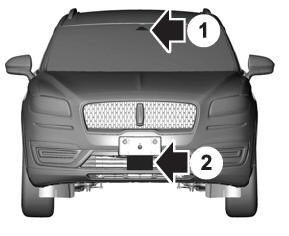
If a message regarding a blocked sensor or camera appears in the information display, something is obstructing the radar signals or camera images. The radar sensor is behind the fascia cover in the center of the lower grille. With a blocked sensor or camera, the system may not function, or performance may reduce. See Pre-Collision Assist – Information Messages.
