
Lincoln Nautilus: Child Safety
Lincoln Nautilus 2018-2026 Owners Manual / Child Safety
- Child Safety Precautions
- Child Restraint Anchor Points
- Child Restraints
- Installing Child Restraints
- Booster Seats
- Child Safety Locks
 Rear Exterior
See Opening the Hands-Free Liftgate.
See Replacing the Rear Wiper Blades.
See Locating the Rear Parking Aid Sensors.
See Connecting a Trailer.
See Locating the Rear View Camera...
 Child Safety Precautions
WARNING: Always make sure your
child is secured properly in a device that
is appropriate for their height, age and
weight. Child safety restraints must be
bought separately from your vehicle...
Other information:
Lincoln Nautilus 2018-2026 Service Manual: Wheel Bearing and Wheel Hub - FWD. Removal and Installation
Removal NOTICE: Suspension fasteners are critical parts that affect the performance of vital components and systems. Failure of these fasteners may result in major service expense. Use the same or equivalent parts if replacement is necessary. Do not use a replacement part of lesser quality or substitute design...
Lincoln Nautilus 2018-2026 Service Manual: Passenger Knee Airbag. Removal and Installation
Removal WARNING: The following procedure prescribes critical repair steps required for correct restraint system operation during a crash. Follow all notes and steps carefully. Failure to follow step instructions may result in incorrect operation of the restraint system and increases the risk of serious personal injury or death in a crash...
Categories
- Manuals Home
- 1st Generation Nautilus Owners Manual
- 1st Generation Nautilus Service Manual
- Switching the Lane Keeping System On and Off. Switching the Lane Keeping System Mode
- Interior Lamp Function. Adjusting the Instrument Panel Lighting Brightness. Ambient Lighting. Interior Lighting – Troubleshooting
- Programming the Garage Door Opener to Your Garage Door Opener Motor
- New on site
- Most important about car
Parking Aid Indicators. Parking Aids – Troubleshooting
Parking Aid Indicators
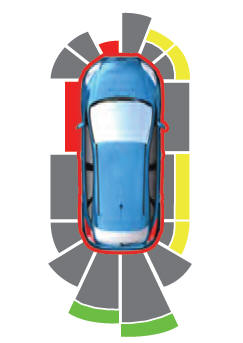
The system provides object distance indication through the information and entertainment display.
As the distance to the object decreases, the indicator waves and the lines move toward the vehicle icon. If there is no object detected, the distance indicator lines are grey.
Copyright © 2026 www.linautilus.com