
Lincoln Nautilus: Exterior Trim and Ornamentation / Front Door Moulding. Removal and Installation
Lincoln Nautilus 2018-2026 Service Manual / Body and Paint / Body and Paint / Exterior Trim and Ornamentation / Front Door Moulding. Removal and Installation
Removal
NOTE: LH side shown, RH side similar.
NOTE: Removal steps in this procedure may contain installation details.
-
NOTICE: To avoid damage to moulding, only use moderate force.
Using a non-marring trim removal tool, disengage the retainer clips.
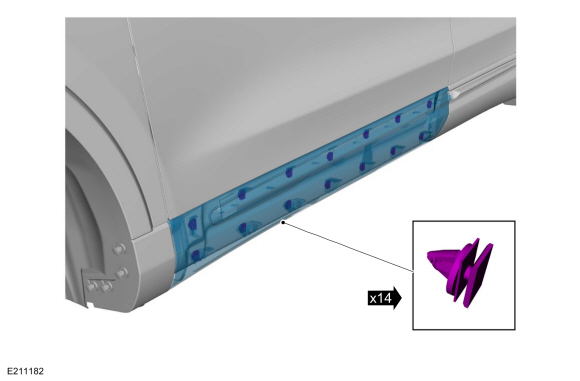 |
-
Remove the moulding.
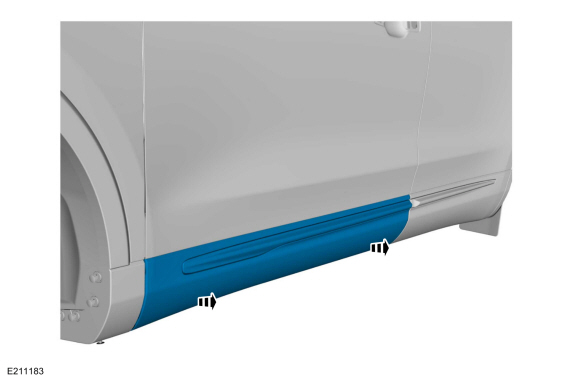 |
Installation
-
To install, reverse the removal procedure.
 D-Pillar Moulding. Removal and Installation
Removal
NOTE:
LH side shown, RH side similar.
NOTE:
Removal steps in this procedure may include installation details.
Remove the pushpins...
 Front Door Upper Moulding. Removal and Installation
Removal
NOTE:
Removal steps in this procedure may contain installation details.
Vehicles With: Keyless Entry
Remove the front door latch on the affected side, to gain clearance for removal of the electrical connector...
Other information:
Lincoln Nautilus 2018-2026 Service Manual: Wireless Accessory Charging Module (WACM). Removal and Installation
Removal NOTE: Removal steps in this procedure may contain installation details. NOTE: If installing a new module, it is necessary to upload the module configuration information to the scan tool prior to removing the module. This information must be downloaded into the new module after installation...
Lincoln Nautilus 2018-2026 Service Manual: Paintwork Defects and Damage. General Procedures
Materials Name Specification Motorcraft® Acid NeutralizerZC-1-A - Motorcraft® Alkaline NeutralizerZC-2-A - Repair NOTE: Refinishing - Environmental Damage WARNING: Before beginning any service procedure in this manual, refer to health and safety warnings in section 100-00 General Information...
Categories
- Manuals Home
- 1st Generation Nautilus Owners Manual
- 1st Generation Nautilus Service Manual
- Changing the 12V Battery
- Folding the Exterior Mirrors - Vehicles With: Manual Folding Mirrors. Folding the Exterior Mirrors - Vehicles With: Power Folding Mirrors
- Massage Seats
- New on site
- Most important about car
Locating the Pre-Collision Assist Sensors
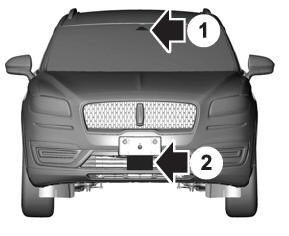
If a message regarding a blocked sensor or camera appears in the information display, something is obstructing the radar signals or camera images. The radar sensor is behind the fascia cover in the center of the lower grille. With a blocked sensor or camera, the system may not function, or performance may reduce. See Pre-Collision Assist – Information Messages.

Copyright © 2026 www.linautilus.com