
Lincoln Nautilus: Instrumentation, Message Center and Warning Chimes / Instrument Panel Cluster (IPC). Removal and Installation
Lincoln Nautilus 2018-2026 Service Manual / Electrical / Instrumentation and Warning Systems / Instrumentation, Message Center and Warning Chimes / Instrument Panel Cluster (IPC). Removal and Installation
Removal
NOTE: Removal steps in this procedure may contain installation details.
-
NOTE: If installing a new module, it is necessary to upload the module configuration information to the scan tool prior to removing the module. This information must be downloaded into the new module after installation.
Using a diagnostic scan tool, begin the PMI process for the IPC following the on-screen instructions. Record the odometer value from the original IPC . If the odometer value cannot be obtained from the IPC (display failure), perform the diagnostic routine. If the value cannot be obtained after the diagnostic routine, the customer should supply the approximate odometer value.
-
Remove the instrument panel upper section.
Refer to: Instrument Panel Upper Section (501-12 Instrument Panel and Console, Removal and Installation).
-
Remove the screws and position aside the IPC .
Torque: 22 lb.in (2.5 Nm)
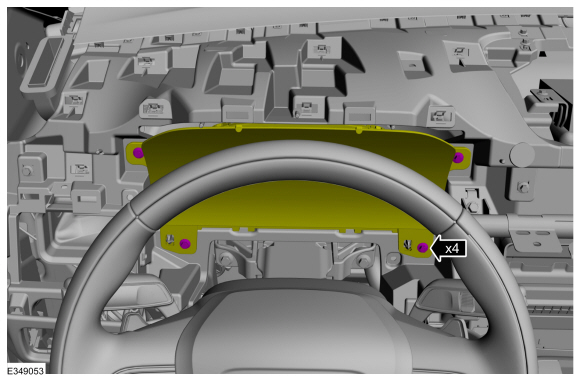 |
-
Disconnect the electrical connector.
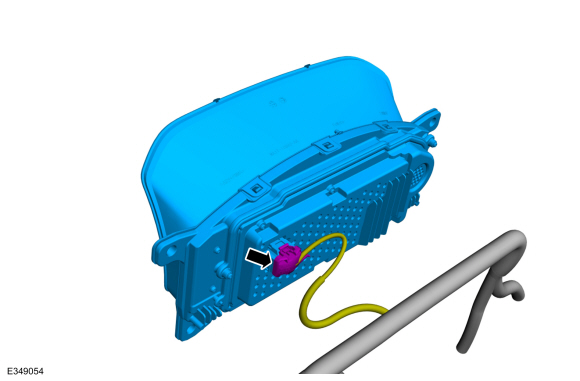 |
Installation
-
To install, reverse the removal procedure.
-
Using a diagnostic scan tool, complete the PMI process for the IPC following the on-screen instructions.
 Seatbelt Minder Deactivating/Activating. General Procedures
Activation
WARNING:
Before beginning any service procedure in this section,
refer to Safety Warnings in section 100-00 General Information...
 Instrument Panel Cluster (IPC) Lens. Removal and Installation
Removal
Remove the IPC .
Refer to: Instrument Panel Cluster (IPC) (413-01 Instrumentation, Message Center and Warning Chimes, Removal and Installation)...
Other information:
Lincoln Nautilus 2018-2026 Service Manual: Rear Floor Panel Section. Removal and Installation
Special Tool(s) / General Equipment Spherical Cutter Grinder Air Body Saw MIG/MAG Welding Equipment Spot Weld Drill Bit Materials Name Specification Flange SealantCU7Z-19B508-A WSS-M2G348-A11 Removal Restore vehicle to pre-accident dimensions, if required...
Lincoln Nautilus 2018-2026 Service Manual: Brake Caliper Anchor Plate. Removal and Installation
Removal NOTE: Removal steps in this procedure may contain installation details. Remove the brake pads. Refer to: Brake Pads (206-03 Front Disc Brake, Removal and Installation). Remove the bolts and the brake caliper anchor plate...
Categories
- Manuals Home
- 1st Generation Nautilus Owners Manual
- 1st Generation Nautilus Service Manual
- Engine Oil Capacity and Specification - 2.0L
- Switching the Lane Keeping System On and Off. Switching the Lane Keeping System Mode
- Auto-Start-Stop
- New on site
- Most important about car
Replacing the Rear Wiper Blades
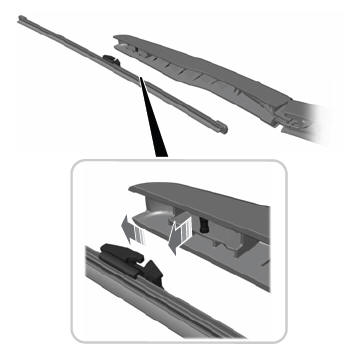
Note: Do not hold the wiper blade to lift the wiper arm.
Remove the wiper blade.
Copyright © 2026 www.linautilus.com