
Lincoln Nautilus: Visual Search / Vehicle Interior
Lincoln Nautilus 2018-2026 Owners Manual / Visual Search / Vehicle Interior
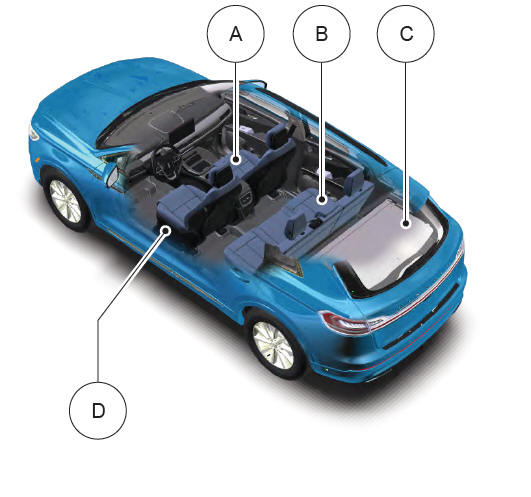
- See Moving the Seat Backward and Forward.
- See Folding the Seat Backrest.
- See Installing and Removing the Luggage Compartment Cover.
- See Adjusting the Lumbar Support.
 Center Console
See Switching the Hazard Flashers On and Off.
See Switching the Audio Unit On and Off.
See Locating the Power Outlet.
See Switching the Heated Seats On and Off...
 Front Exterior
See Opening and Closing the Hood.
See Replacing the Front Wiper Blades.
See Locating the Keyless Entry Keypad.
See Locating the Front Parking Aid Sensors...
Other information:
Lincoln Nautilus 2018-2026 Service Manual: Fixed Glass. General Procedures
Special Tool(s) / General Equipment Glass Cut-Out Wire Power Caulk Gun Power Fixed Glass Removal Tool Cold Knife Knife Vacuum Cleaner Materials Name Specification Sika® SikaTack® MACH 60 / Sika® SikaTack® MACH 30 / Dow® BETASEAL™ Express - Sika Tack ASAP Urethane Adhesive - Motorcraft® Ultra-Clear Spray Glass CleanerZC-..
Lincoln Nautilus 2018-2026 Owners Manual: Switching Cross Traffic Alert On and Off. Locating the Cross Traffic Alert Sensors. Cross Traffic Alert Indicators. Cross Traffic Alert – Troubleshooting
Switching Cross Traffic Alert On and Off To switch cross traffic alert on or off use the instrument cluster display: Using the instrument cluster display controls on the steering wheel, select SETTINGS. Select Driver assistance. Switch Cross traffic alert on or off. Locating the Cross Traffic Alert Sensors The sensors are behind the rear bumper on both sides of your vehicle. Note: Keep..
Categories
- Manuals Home
- 1st Generation Nautilus Owners Manual
- 1st Generation Nautilus Service Manual
- Child Safety Locks
- Interior Lamp Function. Adjusting the Instrument Panel Lighting Brightness. Ambient Lighting. Interior Lighting – Troubleshooting
- Drive Mode Control
- New on site
- Most important about car
Locating the Pre-Collision Assist Sensors
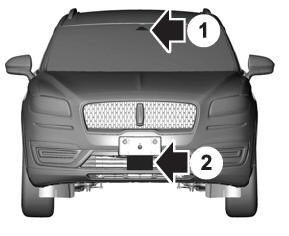
If a message regarding a blocked sensor or camera appears in the information display, something is obstructing the radar signals or camera images. The radar sensor is behind the fascia cover in the center of the lower grille. With a blocked sensor or camera, the system may not function, or performance may reduce. See Pre-Collision Assist – Information Messages.

Copyright © 2026 www.linautilus.com