
Lincoln Nautilus: Phone as a Key / What Is Phone As a Key. Phone as a Key Limitations
Lincoln Nautilus 2018-2026 Owners Manual / Phone as a Key / What Is Phone As a Key. Phone as a Key Limitations
What Is Phone As a Key
Phone as a Key allows you to use your phone in place of a passive key.
You can use your phone for the following functions:
- Remote locking and unlocking.
- Passive entry and exit.
- Passive start and drive the vehicle.
- Remote start.
- Memory function recall.
Phone as a Key Limitations
Limitations can vary based on the make and model of your phone, phone location and physical obstructions.
The following items could impact Phone as a Key performance or prevent functionality in some cases:
- The typical operating range for Phone as a Key is 131 ft (40 m).
- Your Bluetooth connection is not enabled, is disrupted, or out of range.
- Your Phone as a Key is not active or enabled on at least one phone.
- Your vehicle battery has depleted.
- Your phone battery has depleted.
- Interference from other devices using radio frequencies or physical obstructions.
- Your phone is too close to metal objects or other electronic devices.
Note: Do not leave a duplicate coded key in the vehicle. Always take your keys and phone and lock all doors when leaving the vehicle.

 Programming Your Phone
To program your smartphone as Phone as a
Key:
Visit your device's app store to download
the Lincoln Way app.
Create or sign-in to the Lincoln Way app
and add the vehicle identification number
to your account...
Other information:
Lincoln Nautilus 2018-2026 Owners Manual: Personalized Settings
Changing the Instrument Cluster Display Language Note: Available languages vary by region. Changing the Measure Unit Changing the Temperature Unit ..
Lincoln Nautilus 2018-2026 Service Manual: Rear Wheelhouse Outer. Removal and Installation
Special Tool(s) / General Equipment Resistance Spotwelding Equipment Spherical Cutter Plasma Cutter Air Body Saw MIG/MAG Welding Equipment Locking Pliers Materials Name Specification Seam SealerTA-2-B, 3M™ 08308, LORD Fusor® 803DTM - Removal Restore vehicle to pre-accident dimensions, if required. Refer to: Body and Frame (501-26..
Categories
- Manuals Home
- 1st Generation Nautilus Owners Manual
- 1st Generation Nautilus Service Manual
- Child Safety Locks
- Programming the Garage Door Opener to Your Garage Door Opener Motor
- Locating the Pre-Collision Assist Sensors
- New on site
- Most important about car
Replacing the Rear Wiper Blades
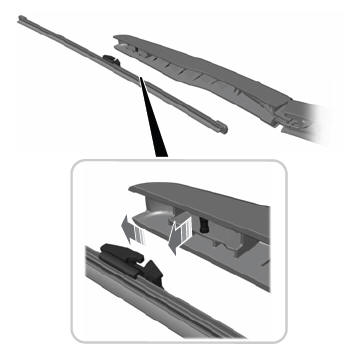
Note: Do not hold the wiper blade to lift the wiper arm.
Remove the wiper blade.
Copyright © 2026 www.linautilus.com