
Lincoln Nautilus: Front Suspension / Wheel Studs. Removal and Installation
Lincoln Nautilus 2018-2026 Service Manual / Chassis / Suspension / Front Suspension / Wheel Studs. Removal and Installation
Special Tool(s) / General Equipment
| Hydraulic Press |
Removal
-
Remove the front wheel bearing and wheel hub.
Refer to: Front Wheel Bearing and Wheel Hub (204-01 Front Suspension, Removal and Installation).
-
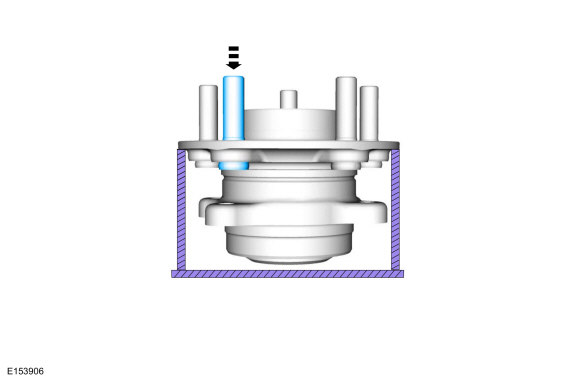
Press the wheel stud from the wheel bearing and wheel hub flange.
Use the General Equipment: Hydraulic Press
 |
-
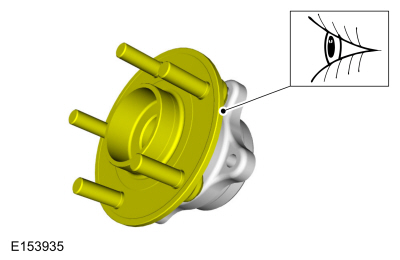
Inspect the wheel bearing and wheel hub flange for corrosion or damage. Replace as necessary.
 |
Installation
-
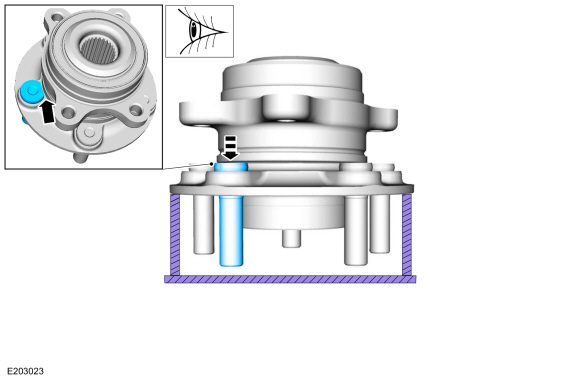
NOTE: The flat side of the wheel stud head must be facing the wheel bearing.
Press the wheel stud into the wheel bearing and wheel hub flange until fully seated.
Use the General Equipment: Hydraulic Press
 |
-
Install the front wheel bearing and wheel hub.
Refer to: Front Wheel Bearing and Wheel Hub (204-01 Front Suspension, Removal and Installation).
 Wheel Knuckle. Removal and Installation
Special Tool(s) /
General Equipment
Tie Rod End Remover
Removal
NOTICE:
Suspension fasteners are critical parts that affect the
performance of vital components and systems...
 Front Strut and Spring Assembly. Disassembly and Assembly
Special Tool(s) /
General Equipment
Spring Compressor
Vise
DISASSEMBLY
NOTICE:
Suspension fasteners are critical parts that affect the
performance of vital components and systems...
Other information:
Lincoln Nautilus 2018-2026 Service Manual: Brake Booster. Removal and Installation
Removal NOTICE: Do not spill brake fluid on painted or plastic surfaces or damage to the surface may occur. If brake fluid is spilled onto a painted or plastic surface, immediately wash the surface with water. NOTE: Removal steps in this procedure may contain installation details...
Lincoln Nautilus 2018-2026 Owners Manual: Fastening and Unfastening the Seatbelts
All seatbelts in your vehicle are a three-point combination lap and shoulder seatbelt. Seatbelt tongue. Seatbelt buckle. Pull the seatbelt out steadily.Note: It may lock if you pull it sharply or if the vehicle is on a slope. Insert the tongue into the buckle...
Categories
- Manuals Home
- 1st Generation Nautilus Owners Manual
- 1st Generation Nautilus Service Manual
- Massage Seats
- Interior Lamp Function. Adjusting the Instrument Panel Lighting Brightness. Ambient Lighting. Interior Lighting – Troubleshooting
- Replacing the Rear Wiper Blades
- New on site
- Most important about car
Locating the Pre-Collision Assist Sensors
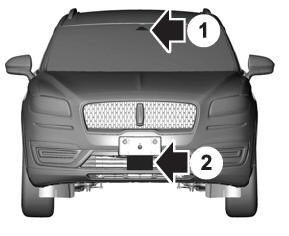
If a message regarding a blocked sensor or camera appears in the information display, something is obstructing the radar signals or camera images. The radar sensor is behind the fascia cover in the center of the lower grille. With a blocked sensor or camera, the system may not function, or performance may reduce. See Pre-Collision Assist – Information Messages.

Copyright © 2026 www.linautilus.com