
Lincoln Nautilus: Lane Keeping System / Alert and Aid Mode
Lincoln Nautilus 2018-2026 Owners Manual / Lane Keeping System / Alert and Aid Mode
What Is Alert and Aid Mode
Alert and aid mode uses multiple features to keep you in your lane. The system first provides a small steering input to bring your vehicle back towards the center of the lane. If your vehicle moves too far out of the center of the lane the system alerts you with vibration in the steering wheel.
How Does Alert and Aid Mode Work
- Alert.
- Aid.
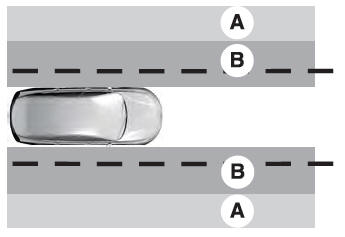
The lane keeping system detects a lane departure and provides aid when the vehicles enters B and applies the additional alert warning if A is entered.
 Lane Keeping System Settings. Alert Mode. Aid Mode
Lane Keeping System Settings
To change the steering wheel vibration, use
the instrument cluster display:
Using the instrument cluster display
controls on the steering wheel, select
Driver Assist...
 Lane Keeping System Indicators
If you switch the lane keeping system on, a
graphic with lane markings appears in the
information display.
When you switch the system off, the lane
marking graphics do not display...
Other information:
Lincoln Nautilus 2018-2026 Service Manual: Plastic Repairs. General Procedures
Special Tool(s) / General Equipment ALCV-200 Materials Name Specification Plastic Bonding AdhesiveTA-9 - Inspection NOTE: Plastics Identification WARNING: Before beginning any service procedure in this section, REFER to Safety Warnings in section 100-00 General Information...
Lincoln Nautilus 2018-2026 Service Manual: Jacking and Lifting - Overview. Description and Operation
Jacking and Lifting Points NOTE: LH side shown, RH side similar. Only the specified jacking points may be used for jacking and supporting the vehicle. WARNING: Position the hoist lift arms as shown in the illustration. Incorrect positioning could result in vehicle slipping or falling from the hoist...
Categories
- Manuals Home
- 1st Generation Nautilus Owners Manual
- 1st Generation Nautilus Service Manual
- Drive Mode Control
- Engine Oil Capacity and Specification - 2.0L
- Fuel Quality
- New on site
- Most important about car
Clearing the Garage Door Opener. Reprogramming the Garage Door Opener. Garage Door Opener Radio Frequencies
Clearing the Garage Door Opener

Copyright © 2026 www.linautilus.com