
Lincoln Nautilus: Parking Aid - Vehicles With: Rear Parking Aid / Azimuth System Check. General Procedures
Check
-
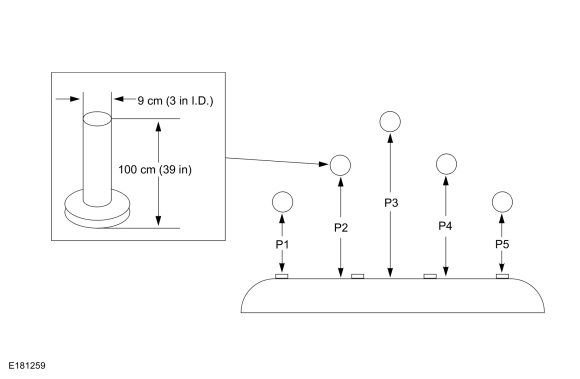
NOTE: The object used in this system check can be fabricated using a 9 cm diameter (3 in I.D.) pipe, 100 cm (39 in) in length (available as Polyvinyl Chloride (PVC) pipe, or similar from a hardware or plumbing supply.
NOTE: The following system check should be carried out with the vehicle on a level surface.
NOTE: Actual sensor arrangement may differ from the configuration shown.
Distribute the test objects evenly across the bumper as shown. Refer to the specifications in this section.
 |
-
Turn the ignition switch to the ON position, engine off.
-
Apply the parking brake.
-
Select REVERSE (R) for rear parking aid.
-
Select DRIVE (D) for front parking aid.
-
NOTE: The system provides audio warnings only when the vehicle is moving or when the vehicle is stationary and the detected obstacle is less than 12 in (30 cm) away from the bumper.
Using a diagnostic scan tool, monitor the parking aid sensor distance Parameter Identifications (PIDs) to verify the objects are detected when placed in the specified locations (P1, P2, P3, P4 and P5).
 Parking Aid. Diagnosis and Testing
Diagnostic Trouble Code (DTC) Chart
Diagnostics in this manual assume a certain skill level and knowledge of Ford-specific diagnostic practices. REFER to: Diagnostic Methods (100-00 General Information, Description and Operation)...
 Elevation System Check. General Procedures
Check
Turn the ignition ON, engine OFF.
Set the parking brake.
Place the gearshift in REVERSE (R) for rear parking aid sensors...
Other information:
Lincoln Nautilus 2018-2026 Service Manual: Passenger Knee Airbag. Removal and Installation
Removal WARNING: The following procedure prescribes critical repair steps required for correct restraint system operation during a crash. Follow all notes and steps carefully. Failure to follow step instructions may result in incorrect operation of the restraint system and increases the risk of serious personal injury or death in a crash...
Lincoln Nautilus 2018-2026 Owners Manual: Lincoln Protect
WHAT IS LINCOLN PROTECT Protect yourself from the rising cost of vehicle repairs with the Lincoln Protect extended service plan. Lincoln Protect Extended Service Plans (United States Only) Lincoln Protect means peace of mind. It is the extended service plan backed by the Lincoln Motor Company, and provides more protection beyond the New Vehicle Limited Warranty coverage...
Categories
- Manuals Home
- 1st Generation Nautilus Owners Manual
- 1st Generation Nautilus Service Manual
- Programming the Garage Door Opener to Your Garage Door Opener Motor
- Anti-Theft Alarm System Settings. Security – Troubleshooting
- Opening and Closing the Hood
- New on site
- Most important about car
Locating the Pre-Collision Assist Sensors
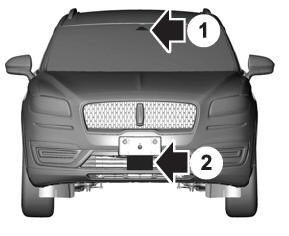
If a message regarding a blocked sensor or camera appears in the information display, something is obstructing the radar signals or camera images. The radar sensor is behind the fascia cover in the center of the lower grille. With a blocked sensor or camera, the system may not function, or performance may reduce. See Pre-Collision Assist – Information Messages.
