
Lincoln Nautilus: Seatbelt Systems / Rear Seatbelt Buckle. Removal and Installation
Lincoln Nautilus 2018-2026 Service Manual / Body and Paint / Body and Paint / Seatbelt Systems / Rear Seatbelt Buckle. Removal and Installation
Removal
NOTE: Removal steps in this procedure may contain installation details.
All rear seatbelt buckles
-
Remove the rear seat cushion.
Refer to: Rear Seat Cushion (501-10B Rear Seats, Removal and Installation).
RH rear seatbelt buckle
-
Remove the RH rear seat backrest.
Refer to: Rear Seat Backrest (501-10 Rear Seats) .
All rear seatbelt buckles
-
NOTE: LH shown, RH similar.
NOTE: For LH side, rear center seatbelt shown removed for clarity.
Remove the seatbelt buckle.
-
Remove the seatbelt buckle bolt.
Torque: 35 lb.ft (47.5 Nm)
-
Detach the wiring harness routing clip.
-
Detach the wiring harness routing clip and disconnect the electrical connector.
-
Remove the seatbelt buckle.
-
Remove the seatbelt buckle bolt.
 |
Installation
NOTE: During installation, make sure the seatbelt webbing is not twisted and the seatbelts and buckles are accessible to the occupants.
-
To install, reverse the removal procedure.
-
Check the seatbelt system for correct operation.
Refer to: Seatbelt Systems (501-20A Seatbelt Systems, Diagnosis and Testing).
 Rear Center Seatbelt Retractor. Removal and Installation
Removal
NOTE:
Removal steps in this procedure may contain installation details.
Remove the LH rear seat backrest cover.
Refer to: Rear Seat Backrest Cover (501-10B Rear Seats, Removal and Installation)...
 Seatbelt Shoulder Height Adjuster. Removal and Installation
Removal
NOTE:
Removal steps in this procedure may contain installation details.
NOTE:
LH shown, RH similar.
Remove the B-pillar trim panel...
Other information:
Lincoln Nautilus 2018-2026 Service Manual: Center Display Screen. Removal and Installation
Special Tool(s) / General Equipment Interior Trim Remover Removal NOTE: Removal steps in this procedure may contain installation details. Release the clips and remove the information and entertainment display unit trim panel. Use the General Equipment: Interior Trim Remover Remove the bolts and position the information and entertainment dis..
Lincoln Nautilus 2018-2026 Owners Manual: Declaration of Conformity
Radio Frequency Statement WARNING: Changes or modifications not expressively approved by the party responsible for compliance could void the user's authority to operate the equipment. The term "IC:" before the radio certification number only signifies that Industry Canada technical specifications were met. These devices comply with Part 15 of the FCC Rules and with RSS-210 of Industry Can..
Categories
- Manuals Home
- 1st Generation Nautilus Owners Manual
- 1st Generation Nautilus Service Manual
- Opening the Liftgate
- Auto Hold
- Opening and Closing the Hood
- New on site
- Most important about car
Parking Aid Indicators. Parking Aids – Troubleshooting
Parking Aid Indicators
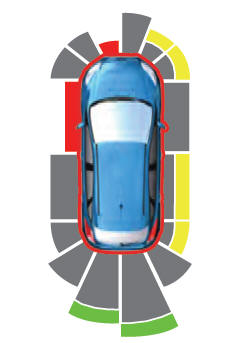
The system provides object distance indication through the information and entertainment display.
As the distance to the object decreases, the indicator waves and the lines move toward the vehicle icon. If there is no object detected, the distance indicator lines are grey.
Copyright © 2026 www.linautilus.com