
Lincoln Nautilus: Electronic Feature Group / Remote Convenience
Lincoln Nautilus 2018-2026 Service Manual / Electrical / Electronic Feature Group / Remote Convenience
- Universal Transmitter - Overview. Description and Operation
- Universal Transmitter - System Operation and Component Description. Description and Operation
- Universal Transmitter. Diagnosis and Testing
 Passive Anti-Theft System (PATS) Center Antenna. Removal and Installation
Removal
Remove the floor console.
Refer to: Floor Console (501-12 Instrument Panel and Console, Removal and Installation).
Remove the floor console bracket...
 Universal Transmitter - Overview. Description and Operation
Overview
The universal transmitter operates garage doors, gates and home or office lighting and security systems. ..
Other information:
Lincoln Nautilus 2018-2026 Owners Manual: Manual Seats
Head Restraint Components Rear Seat Outermost Head Restraints The head restraints consist of: An energy absorbing head restraint. Two steel stems. Guide sleeve unlock and remove buttons. Fold button. Rear Seat Center Head Restraint The head restraint consists of: An energy absorbing head restraint. Two steel stems. Guide sleeve adjust and unlock button. Guide sleeve unlock and..
Lincoln Nautilus 2018-2026 Service Manual: Front Seatbelt Anchor and Pretensioner. Removal and Installation
Special Tool(s) / General Equipment 501-403Tool, Pretensioner Quick ConnectTKIT-2012D-FLTKIT-2012D-ROW Removal NOTE: Removal steps in this procedure may contain installation details. NOTE: RH shown, LH similar. Depower the SRS . Refer to: Supplemental Restraint System (SRS) Depowering (501-20 Supplemental Restraint System) . Remove the lower B-pill..
Categories
- Manuals Home
- 1st Generation Nautilus Owners Manual
- 1st Generation Nautilus Service Manual
- Anti-Theft Alarm System Settings. Security – Troubleshooting
- Auto-Start-Stop
- Interior Lamp Function. Adjusting the Instrument Panel Lighting Brightness. Ambient Lighting. Interior Lighting – Troubleshooting
- New on site
- Most important about car
Replacing the Rear Wiper Blades
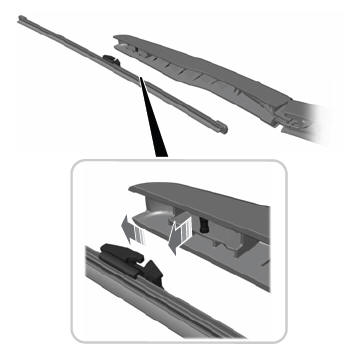
Note: Do not hold the wiper blade to lift the wiper arm.
Remove the wiper blade.
Copyright © 2026 www.linautilus.com