
Lincoln Nautilus: Exterior Lighting / Stoplamp Switch. Removal and Installation
Removal
NOTICE: Do not press, pull or otherwise move the brake pedal while installing the stoplamp switch and cruise control deactivation switch. Install these switches with the booster push rod attached to the brake pedal and with the brake pedal in the at-rest position. Installing these switches with the brake pedal in any other position results in incorrect adjustment and damages the switches.
-
Disconnect the stoplamp switch electrical connector.
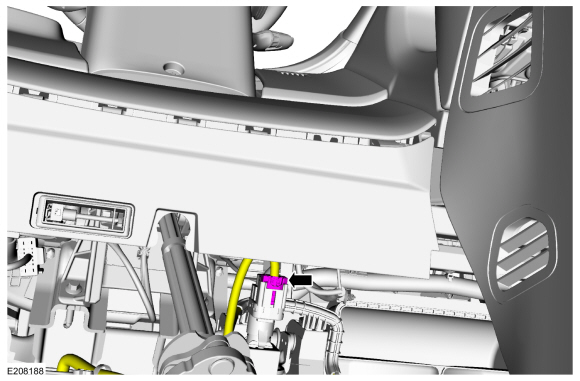 |
-
Turn the stoplamp switch clock-wise and remove the switch.
.jpg) |
Installation
-
To install, reverse the removal procedure.
 Reversing Lamp. Removal and Installation
Removal
Remove the liftgate interior trim panel.
Refer to: Liftgate Trim Panel (501-05 Interior Trim and Ornamentation, Removal and Installation)...
 Trailer Module (TRM). Removal and Installation
Removal
NOTE:
This step is only necessary if the TRM is being replaced.
Using a diagnostic scan tool, begin the PMI process for the TRM following the on-screen instructions...
Other information:
Lincoln Nautilus 2018-2026 Service Manual: Piston Inspection. General Procedures
Inspection NOTE: Do not use a caustic cleaning solution or a wire brush to clean the pistons or damage can occur. Clean and inspect the (1) ring lands, (2) pin bosses, (3) skirts and the (4) tops of the pistons. If wear marks, scores or glazing is found on the piston skirt, check for a bent or twisted connecting rod...
Lincoln Nautilus 2018-2026 Service Manual: Liftgate Latch Manual Release. General Procedures
Special Tool(s) / General Equipment Flat-Bladed Screwdriver Activation All vehicles NOTE: LH side shown, RH side similar. On both sides. Open the rear doors. Release the second row seat cushion latch and position the seat backrests in the full flat position...
Categories
- Manuals Home
- 1st Generation Nautilus Owners Manual
- 1st Generation Nautilus Service Manual
- Massage Seats
- USB Ports
- Auto-Start-Stop
- New on site
- Most important about car
Locating the Pre-Collision Assist Sensors
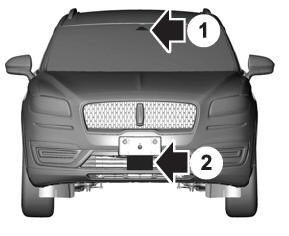
If a message regarding a blocked sensor or camera appears in the information display, something is obstructing the radar signals or camera images. The radar sensor is behind the fascia cover in the center of the lower grille. With a blocked sensor or camera, the system may not function, or performance may reduce. See Pre-Collision Assist – Information Messages.
