
Lincoln Nautilus: Information and Entertainment System - General Information - Vehicles With: SYNC 4 / Telematics Control Unit (TCU) Module. Removal and Installation
Removal
NOTE: Removal steps in this procedure may contain installation details.
NOTE: If installing a new module, it is necessary to upload the module configuration information to the scan tool prior to removing the module. This information must be downloaded into the new module after installation.
-
Using a diagnostic scan tool, begin the PMI process for the TCU following the on-screen instructions.
-
If equipped.
Remove the loadspace floor liner.
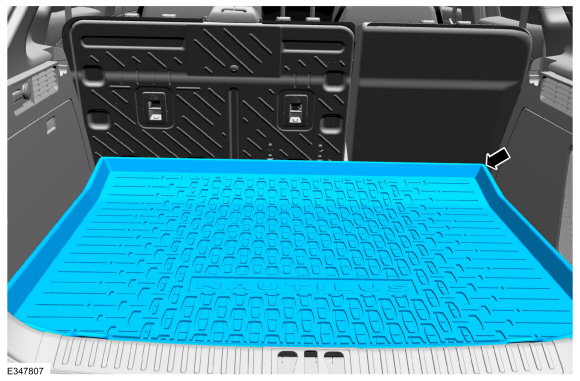 |
-
Remove the loadspace floor panel.
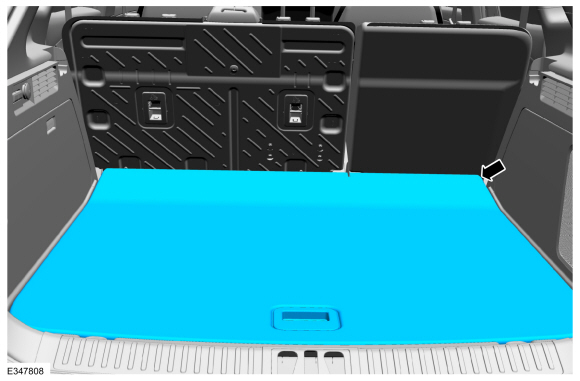 |
-
Separate the TCU from the foam reatainering tabs, disconnect the electrical connectors and remove the TCU .
.jpg) |
Installation
-
To install, reverse the removal procedure.
-
NOTE: This step is only necessary if replacing the TCU .
Using a diagnostic scan tool, complete the PMI process for the TCU following the on-screen instructions.
 SYNC Module [APIM]. Removal and Installation
Removal
NOTE:
Removal steps in this procedure may contain installation details.
Remove the GSM .
Refer to: Gear Shift Module (GSM) (307-05A Automatic Transmission
External Controls - 8-Speed Automatic Transmission – 8F57, Removal and
Installation)...
 Telematics Control Unit (TCU) Module Antenna. Removal and Installation
Removal
Remove the LH loadspace trim panel.
Refer to: Loadspace Trim Panel (501-05)
.
Disconnect the TCU antenna coaxial connector...
Other information:
Lincoln Nautilus 2018-2026 Owners Manual: Phone
Phone Precautions WARNING: Driving while distracted can result in loss of vehicle control, crash and injury. We strongly recommend that you use extreme caution when using any device that may take your focus off the road. Your primary responsibility is the safe operation of your vehicle...
Lincoln Nautilus 2018-2026 Owners Manual: Switching the Lane Keeping System On and Off. Switching the Lane Keeping System Mode
Switching the Lane Keeping System On and Off To activate the lane keeping system, press the button on the turn signal lever. Note: The system stores the on or off setting until manually changed, unless it detects a MyKey™. If the system detects a MyKey™, it defaults to on and the mode is set to alert...
Categories
- Manuals Home
- 1st Generation Nautilus Owners Manual
- 1st Generation Nautilus Service Manual
- Interior Lamp Function. Adjusting the Instrument Panel Lighting Brightness. Ambient Lighting. Interior Lighting – Troubleshooting
- Fuel Quality
- Drive Mode Control
- New on site
- Most important about car
Changing a Flat Tire
WARNING: If the tire pressure monitor sensor becomes damaged it may not function.
Note: The use of tire sealant may damage your tire pressure monitoring system and should only be used in roadside emergencies. If you must use a sealant, use the Tire Mobility Kit sealant. Replace the tire pressure monitoring system sensor and valve stem on the wheel by an authorized dealer after use of the sealant.
Note: The tire pressure monitoring system indicator light will illuminate when the spare tire is in use. To restore the full function of the monitoring system, all road wheels equipped with tire pressure monitoring sensors must be mounted on the vehicle.
If you get a flat tire while driving, do not apply the brake hea
