
Lincoln Nautilus: Exterior Lighting / Headlamp Switch. Removal and Installation
Lincoln Nautilus 2018-2026 Service Manual / Electrical / Lighting / Exterior Lighting / Headlamp Switch. Removal and Installation
Removal
-
Detach the clips and pivot the instrument panel LH lower trim panel downward.
.jpg) |
-
Remove the headlamp switch.
-
Disconnect the headlamp switch electrical connector.
-
Release the tabs and remove the headlamp switch from the instrument panel LH lower trim panel.
-
Disconnect the headlamp switch electrical connector.
.jpg) |
Installation
-
To install, reverse the removal procedure.
 Headlamp Leveling Sensor. Removal and Installation
Removal
Front suspension mounted
Remove the LH front wheel and tire assembly.
Refer to: Wheel and Tire (204-04A Wheels and Tires, Removal and Installation)...
 High Mounted Stoplamp. Removal and Installation
Removal
Remove the rear spoiler.
Refer to: Rear Spoiler (501-08 Exterior Trim and Ornamentation, Removal and Installation).
Remove the high mounted stoplamp...
Other information:
Lincoln Nautilus 2018-2026 Owners Manual: Automatic Transmission Audible Warnings. Automatic Transmission – Troubleshooting
Automatic Transmission Audible Warnings Transmission Not In Park (P) Audible Warning Sounds if you open the driver door before shifting into park (P). Park (P) Selection Audible Warning Sounds when you shift into park (P). Automatic Transmission – Troubleshooting Automatic Transmission – Information Messages ..
Lincoln Nautilus 2018-2026 Service Manual: Front Wheel Bearing and Wheel Hub. Removal and Installation
Special Tool(s) / General Equipment 204-161 (T97P-1175-A) Installer, HalfshaftTKIT-1997-LM2TKIT-1997-F/FM2TKIT-1997-FLM2 205-D070 (D93P-1175-B) Remover, Front Wheel Hub Removal NOTICE: Suspension fasteners are critical parts that affect the performance of vital components and systems. Failure of these fasteners may result in major service expense. Use the same or equi..
Categories
- Manuals Home
- 1st Generation Nautilus Owners Manual
- 1st Generation Nautilus Service Manual
- Normal Scheduled Maintenance
- Anti-Theft Alarm System Settings. Security – Troubleshooting
- Auto-Start-Stop
- New on site
- Most important about car
Parking Aid Indicators. Parking Aids – Troubleshooting
Parking Aid Indicators
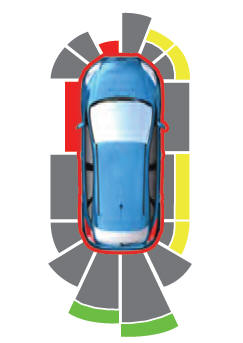
The system provides object distance indication through the information and entertainment display.
As the distance to the object decreases, the indicator waves and the lines move toward the vehicle icon. If there is no object detected, the distance indicator lines are grey.
Copyright © 2026 www.linautilus.com