
Lincoln Nautilus: Glass, Frames and Mechanisms / Rear Door Glass Top Run. Removal and Installation
Lincoln Nautilus 2018-2026 Service Manual / Body and Paint / Body and Paint / Glass, Frames and Mechanisms / Rear Door Glass Top Run. Removal and Installation
Removal
NOTE: LH side shown, RH side similar.
NOTE: Removal steps in this procedure may contain installation details.
-
Lower the rear door window glass to the full down.
 |
-
Remove the rear door trim panel.
Refer to: Rear Door Trim Panel (501-05 Interior Trim and Ornamentation, Removal and Installation).
-
Remove the rear door upper trim.
-
Remove the retainers from the rear door upper trim.
Torque: 9 lb.in (1 Nm)
-
Remove the rear door upper trim.
-
Remove the retainers from the rear door upper trim.
 |
-
Remove the inner belt moulding.
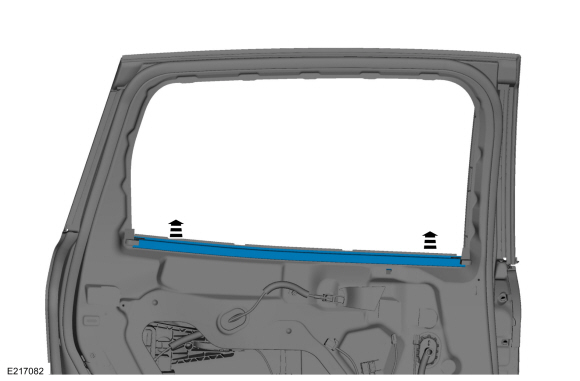 |
-
Remove the rear door upper moulding.
Refer to: Rear Door Upper Moulding (501-08 Exterior Trim and Ornamentation, Removal and Installation).
-
Remove the rear door glass top run.
-
Position aside the top run upper corners and remove the retainers.
Torque: 9 lb.in (1 Nm)
-
Remove the rear door glass top run.
-
Position aside the top run upper corners and remove the retainers.
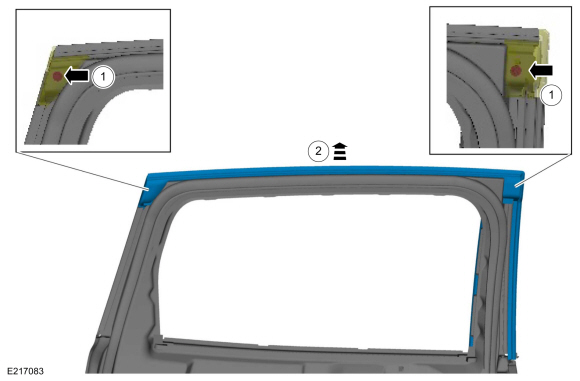 |
Installation
-
To install, reverse the removal procedure.
-
If the door is equipped with one touch up/down, carry out the power door window initialization.
Refer to: Power Door Window Initialization (501-11 Glass, Frames and Mechanisms, General Procedures).
 Rear Door Glass Run and Bracket. Removal and Installation
Removal
NOTE:
LH side shown, RH side similar.
NOTE:
The rear door glass run and bracket is serviced with the door latch assembly only.
Remove the rear door latch...
 Rear Door Window Control Switch. Removal and Installation
Removal
NOTE:
LH side shown, RH side similar.
Remove the rear door window control switch.
Remove the rear door window control switch and the bezel assembly...
Other information:
Lincoln Nautilus 2018-2026 Service Manual: Instrument Panel and Interior Switches Illumination. Diagnosis and Testing
DTC Chart: Body Control Module (BCM) Diagnostics in this manual assume a certain skill level and knowledge of Ford-specific diagnostic practices. REFER to: Diagnostic Methods (100-00 General Information, Description and Operation). DTC Description Action B1315:11 Backlighting (Non Reflective Controls) Illumination Output: Circuit Short To Ground..
Lincoln Nautilus 2018-2026 Owners Manual: Switching the Lane Keeping System On and Off. Switching the Lane Keeping System Mode
Switching the Lane Keeping System On and Off To activate the lane keeping system, press the button on the turn signal lever. Note: The system stores the on or off setting until manually changed, unless it detects a MyKey™. If the system detects a MyKey™, it defaults to on and the mode is set to alert. Note: If the system detects a MyKey™, pressing the button does not affect the on or..
Categories
- Manuals Home
- 1st Generation Nautilus Owners Manual
- 1st Generation Nautilus Service Manual
- Interior Lamp Function. Adjusting the Instrument Panel Lighting Brightness. Ambient Lighting. Interior Lighting – Troubleshooting
- Opening and Closing the Hood
- Normal Scheduled Maintenance
- New on site
- Most important about car
Programming the Garage Door Opener to Your Garage Door Opener Motor

Copyright © 2026 www.linautilus.com