
Lincoln Nautilus: Exterior Trim and Ornamentation / Rear Door Moulding. Removal and Installation
Lincoln Nautilus 2018-2026 Service Manual / Body and Paint / Body and Paint / Exterior Trim and Ornamentation / Rear Door Moulding. Removal and Installation
Removal
NOTE: LH side shown RH side similar.
NOTE: Removal steps in this procedure may contain installation details.
-
NOTICE: To avoid damage to the moulding, only use moderate force.
Using a non-marring trim removal tool disengage the retainers from the door.
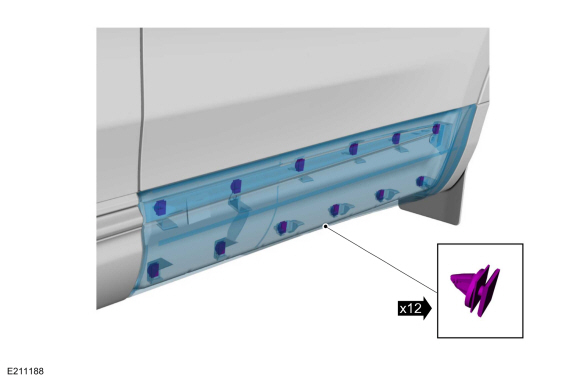 |
-
Remove the moulding.
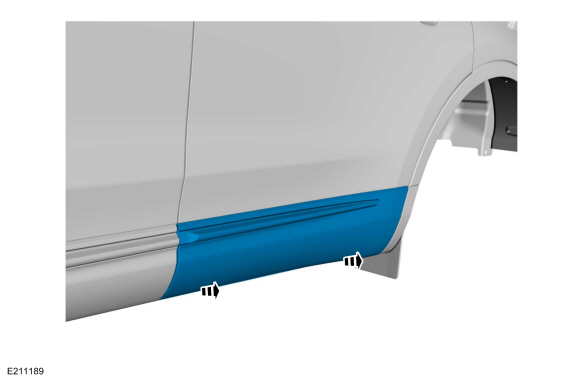 |
Installation
-
To install, reverse the removal procedure.
 Front Fender Moulding. Removal and Installation
Removal
NOTE:
LH side shown, RH side similar.
NOTE:
Removal steps in this procedure may contain installation details.
Remove the pushpins and clip from the rear of the moulding...
 Rear Door Upper Moulding. Removal and Installation
Removal
NOTE:
Removal steps in this procedure may contain installation details.
Aft Rear Door Upper Moulding
Remove the front screw from the upper belt moulding...
Other information:
Lincoln Nautilus 2018-2026 Owners Manual: Data Privacy
WARNING: Do not connect wireless plug-in devices to the data link connector. Unauthorized third parties could gain access to vehicle data and impair the performance of safety related systems. Only allow repair facilities that follow our service and repair instructions to connect their equipment to the data link connector...
Lincoln Nautilus 2018-2026 Service Manual: Health and Safety Precautions. Description and Operation
General Service Warnings Review carefully the information below before beginning any repair. Following these warnings is a list of specific system warnings that must be reviewed before beginning work on any listed system. WARNING: Vehicles equipped with an automatic transmission and a Telematics Control Unit (TCU) have remote start technology and may start the engine at any t..
Categories
- Manuals Home
- 1st Generation Nautilus Owners Manual
- 1st Generation Nautilus Service Manual
- Folding the Exterior Mirrors - Vehicles With: Manual Folding Mirrors. Folding the Exterior Mirrors - Vehicles With: Power Folding Mirrors
- Fuel Quality
- Changing the 12V Battery
- New on site
- Most important about car
Parking Aid Indicators. Parking Aids – Troubleshooting
Parking Aid Indicators
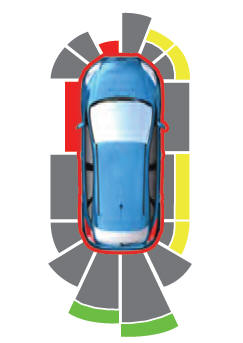
The system provides object distance indication through the information and entertainment display.
As the distance to the object decreases, the indicator waves and the lines move toward the vehicle icon. If there is no object detected, the distance indicator lines are grey.
Copyright © 2026 www.linautilus.com