
Lincoln Nautilus: Suspension System - General Information / Ride Height Measurement. General Procedures
Lincoln Nautilus 2018-2026 Service Manual / Chassis / Suspension / Suspension System - General Information / Ride Height Measurement. General Procedures
Special Tool(s) / General Equipment
| Surface Gauge |
Check
Ride Height Measurement - Front
NOTE: Make sure that the vehicle is positioned on a flat, level surface and the tires are inflated to the correct pressure. Vehicle should have a full tank of fuel.
-
-
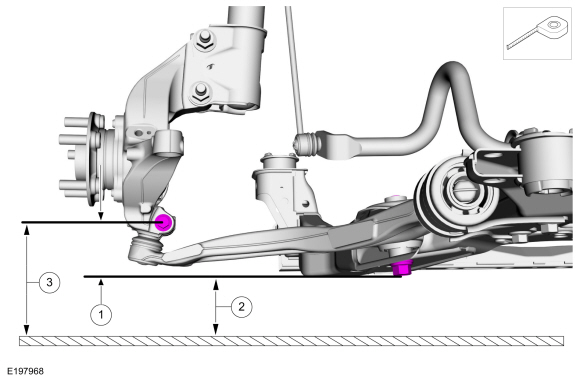
Ride height = 3-2
-
Measure the distance between the flat level
surface and the center of the lower arm forward bolt (measurement 2)
-
Measure the distance between the flat level
surface and the center of the ball joint pinch bolt (measurement 3)
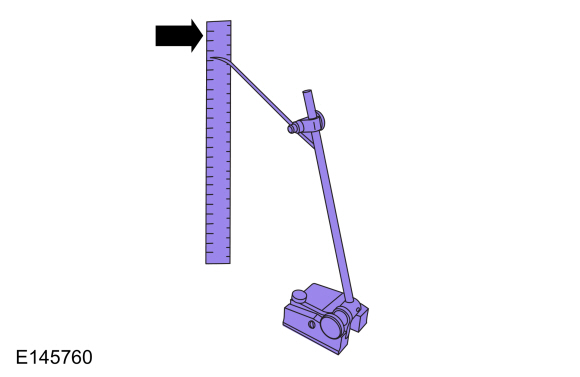
Use the General Equipment: Surface Gauge
-
Ride height = 3-2
 |
-
With the surface gauge positioned on a flat, level
surface, record the measurement of the surface gauge position
(measurement 2) and (measurement 3).
Use the General Equipment: Surface Gauge
 |
-
Subtract measurement 2 from measurement 3 to obtain the front ride height.
Ride Height Measurement - Rear
NOTE: Make sure that the vehicle is positioned on a flat, level surface and the tires are inflated to the correct pressure. Vehicle should have a full tank of fuel.
-
-
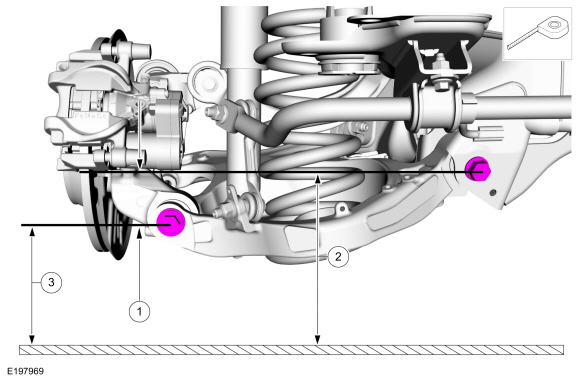
Ride height = 3-2
-
Measurement 2
-
Measurement 3
Use the General Equipment: Surface Gauge
-
Ride height = 3-2
 |
-
Measure the distance between the flat level surface
and the center of the rearward lower arm-to-frame bolt (measurement 2).
-
Measure the distance between the flat level surface
and the center of the lower arm-to-knuckle bolt (measurement 3).
-
Subtract measurement 2 from measurement 3 to obtain the rear ride height.
 Rear Toe Adjustment. General Procedures
Special Tool(s) /
General Equipment
Wheel Alignment System
Adjustment
NOTICE:
Do not use any tools or equipment to move the wheel and tire
assembly or suspension components while checking for relative movement...

Other information:
Lincoln Nautilus 2018-2026 Service Manual: Front Door. Removal and Installation
Special Tool(s) / General Equipment Door Lift Removal NOTE: Removal steps in this procedure may contain installation details. NOTE: LH side shown, RH side similar. Open the door. Remove the check arm bolt. Torque: 18 lb.ft (25 Nm) Disconnect the front door electrical connector. ..
Lincoln Nautilus 2018-2026 Service Manual: Body Closures - Overview. Description and Operation
Overview The power liftgate feature allows power opening and closing of the liftgate using any of the following methods: The front power liftgate switch (located on the instrument panel). The rear interior power liftgate switch (located on the bottom side of the liftgate trim panel) (close only). The exterior liftgate release switch (located near the rear license plate lamp). ..
Categories
- Manuals Home
- 1st Generation Nautilus Owners Manual
- 1st Generation Nautilus Service Manual
- Fuel Quality
- Drive Mode Control
- Replacing the Rear Wiper Blades
- New on site
- Most important about car
Clearing the Garage Door Opener. Reprogramming the Garage Door Opener. Garage Door Opener Radio Frequencies
Clearing the Garage Door Opener

Copyright © 2026 www.linautilus.com