
Lincoln Nautilus: Steering Wheel and Column Electrical Components / Steering Wheel Multifunction Switch. Removal and Installation
Lincoln Nautilus 2018-2026 Service Manual / Chassis / Steering System / Steering Wheel and Column Electrical Components / Steering Wheel Multifunction Switch. Removal and Installation
Removal
NOTE: Removal steps in this procedure may contain installation details.
NOTE: Steering wheel with active steering shown others similar.
-
Remove the driver airbag.
Refer to: Driver Airbag (501-20B Supplemental Restraint System, Removal and Installation).
Refer to: Driver Airbag - Vehicles With: Adaptive Steering (501-20B Supplemental Restraint System, Removal and Installation).
-
On both sides.
Disconnect the electrical connectors.
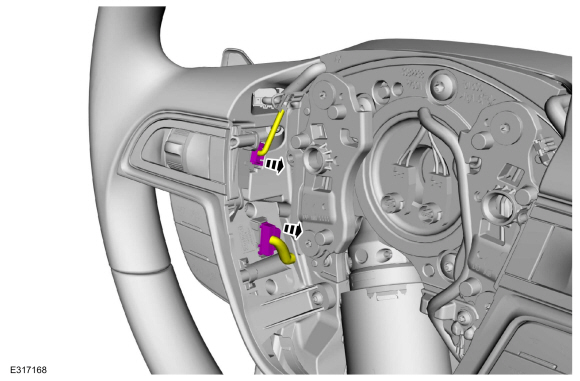 |
-
Remove the steering wheel multifunction switch bezel assembly.
-
Remove the retainers.
-
Using a suitable flat-bladed tool, remove the steering wheel bezel.
-
Remove the retainers.
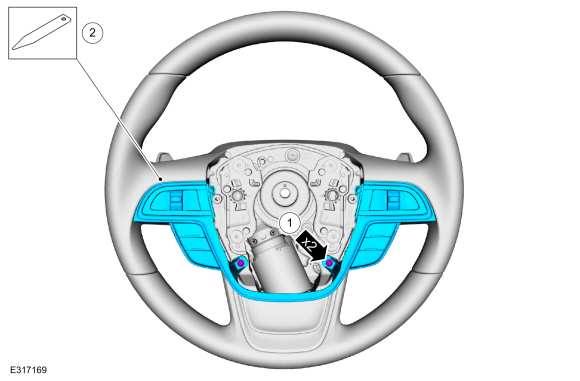 |
-
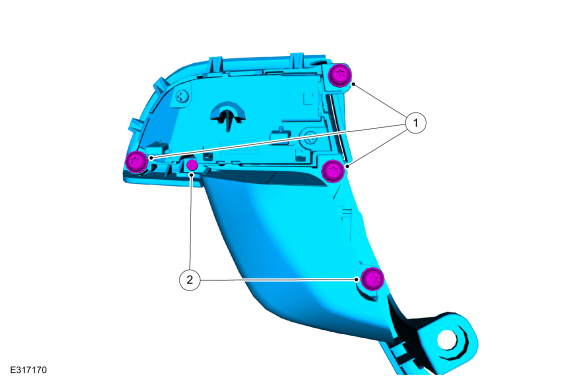
On both sides.
Remove the steering wheel multifunction switches.
-
Remove the retainers and the upper steering wheel multifunction switch.
-
Remove the retainers and the lower steering wheel multifunction switch.
-
Remove the retainers and the upper steering wheel multifunction switch.
 |
Installation
-
To install, reverse the removal procedure.
 Steering Column Multifunction Switch RH. Removal and Installation
Removal
NOTE:
Removal steps in this procedure may contain installation details.
Remove the steering column shrouds.
Refer to: Steering Column Shrouds (501-05 Interior Trim and Ornamentation, Removal and Installation)...
 Powertrain
..
Other information:
Lincoln Nautilus 2018-2026 Service Manual: Parking Brake. Diagnosis and Testing
DTC Chart: Anti-Lock Brake System (ABS) Module Diagnostics in this manual assume a certain skill level and knowledge of Ford-specific diagnostic practices. REFER to: Diagnostic Methods (100-00 General Information, Description and Operation). NOTE: If present, diagnose DTC C2007:13 Right Motor: Circuit Open or C2008:13 Left Motor: Circuit Open before diagnosing all other Diagnostic Tr..
Lincoln Nautilus 2018-2026 Service Manual: Wireless Accessory Charging Module (WACM). Removal and Installation
Removal NOTE: Removal steps in this procedure may contain installation details. NOTE: If installing a new module, it is necessary to upload the module configuration information to the scan tool prior to removing the module. This information must be downloaded into the new module after installation. If installing a new module, it is necessary to upload the module configuration inf..
Categories
- Manuals Home
- 1st Generation Nautilus Owners Manual
- 1st Generation Nautilus Service Manual
- Opening and Closing the Hood
- Normal Scheduled Maintenance
- Opening the Liftgate
- New on site
- Most important about car
Opening and Closing the Hood
Opening the Hood

Copyright © 2026 www.linautilus.com