
Lincoln Nautilus: Body Closures / Rear Gate Trunk Module (RGTM). Removal and Installation
Lincoln Nautilus 2018-2026 Service Manual / Body and Paint / Body and Paint / Body Closures / Rear Gate Trunk Module (RGTM). Removal and Installation
Removal
-
NOTE: This step is only necessary when installing a new component.
NOTE: The PMI process must begin with the current RGTM installed. If the current RGTM does not respond to the diagnostic scan tool, the tool may prompt for As-Built Data as part of the repair.
Using a diagnostic scan tool, begin the PMI process for the RGTM following the on-screen instructions.
-
Open the liftgate.
.jpg) |
-
Remove the liftgate trim panel.
Refer to: Liftgate Trim Panel (501-05 Interior Trim and Ornamentation, Removal and Installation).
-
-
Disconnect the electrical connectors.
-
Remove the screws and the RGTM .
-
Disconnect the electrical connectors.
.jpg) |
Installation
-
To install, reverse the removal procedure.
-
NOTE: This step is only necessary when installing a new component.
Using a diagnostic scan tool, complete the PMI process for the RGTM following the on-screen instructions.
-
Carry-out the power liftgate initialization.
Refer to: Power Liftgate Initialization (501-03 Body Closures, General Procedures).
 Rear Door Check Arm. Removal and Installation
Removal
NOTE:
Removal steps in this procedure may contain installation details.
NOTE:
LH side shown, RH similar.
Open the door.
Remove the rear check arm bolt...

Other information:
Lincoln Nautilus 2018-2026 Owners Manual: Information and Entertainment Display Precautions. Information and Entertainment Display Limitations
Information and Entertainment Display Precautions WARNING: Driving while distracted can result in loss of vehicle control, crash and injury. We strongly recommend that you use extreme caution when using any device that may take your focus off the road. Your primary responsibility is the safe operation of your vehicle. We recommend against the use of any hand-held device while driving and e..
Lincoln Nautilus 2018-2026 Service Manual: Interior Rear View Mirror. Removal and Installation
Removal NOTE: Removal steps in this procedure may contain installation details. Remove the IPMA cover. Release the tabs and clips from the IPMA cover. Disconnect the wiring harness electrical connector and remove the IPMA cover. Disconnect the electrical connector and position the wiring harness aside. ..
Categories
- Manuals Home
- 1st Generation Nautilus Owners Manual
- 1st Generation Nautilus Service Manual
- Engine Oil Capacity and Specification - 2.0L
- USB Ports
- Programming the Garage Door Opener to Your Garage Door Opener Motor
- New on site
- Most important about car
Parking Aid Indicators. Parking Aids – Troubleshooting
Parking Aid Indicators
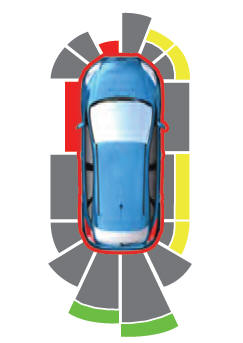
The system provides object distance indication through the information and entertainment display.
As the distance to the object decreases, the indicator waves and the lines move toward the vehicle icon. If there is no object detected, the distance indicator lines are grey.
Copyright © 2026 www.linautilus.com