
Lincoln Nautilus: Body and Paint / Handles, Locks, Latches and Entry Systems
Lincoln Nautilus 2018-2026 Service Manual / Body and Paint / Body and Paint / Handles, Locks, Latches and Entry Systems
- Handles, Locks, Latches and Entry Systems - Component Location. Description and Operation
- Handles, Locks, Latches and Entry Systems - Overview. Description and Operation
- Handles, Locks, Latches and Entry Systems - System Operation and Component Description. Description and Operation
- Locks, Latches and Entry Systems. Diagnosis and Testing
- Door Latch Lubrication. General Procedures
- Liftgate Latch Manual Release. General Procedures
- Staged Unlock Programming. General Procedures
- Door Lock Cylinder. Removal and Installation
- Exterior Front Door Handle. Removal and Installation
- Exterior Front Door Handle Reinforcement. Removal and Installation
- Exterior Rear Door Handle. Removal and Installation
- Exterior Rear Door Handle Reinforcement. Removal and Installation
- Front Door Latch. Removal and Installation
- Front Door Lock Control Switch. Removal and Installation
- Fuel Filler Door Latch. Removal and Installation
- Hood Latch. Removal and Installation
- Hood Latch Release Cable. Removal and Installation
- Hood Latch Release Handle. Removal and Installation
- Interior Front Door Handle. Removal and Installation
- Interior Rear Door Handle. Removal and Installation
- Keyless Entry Keypad. Removal and Installation
- Keyless Entry Rear Antenna. Removal and Installation
- Liftgate Latch. Removal and Installation
- Liftgate Release Switch. Removal and Installation
- Rear Door Latch. Removal and Installation
- Remote Keyless Entry (RKE) Exterior Sounder. Removal and Installation
 Overhead Console. Removal and Installation
Removal
NOTE:
Removal steps in this procedure may contain installation details.
Insert trim tool in location(s) shown.
Rotate the tool 90 degrees to release the overhead console rear retainers...
 Handles, Locks, Latches and Entry Systems - Component Location. Description and Operation
Item
Description
1
RTM
2
BCM
3
Exterior sounder
4
Keyless entry rear antenna
..
Other information:
Lincoln Nautilus 2018-2026 Service Manual: Front Door Upper Moulding. Removal and Installation
Removal NOTE: Removal steps in this procedure may contain installation details. Vehicles With: Keyless Entry Remove the front door latch on the affected side, to gain clearance for removal of the electrical connector. Refer to: Front Door Latch (501-14 Handles, Locks, Latches and Entry Systems, Removal and Installation). All..
Lincoln Nautilus 2018-2026 Service Manual: Headlamp Control Module (HCM). Removal and Installation
Removal NOTE: Removal steps in this procedure may contain installation details. NOTE: This step is only necessary if the HCM is being replaced. NOTE: If installing a new module, it is necessary to upload the module configuration information to the scan tool prior to removing the module. This information must be downloaded into the new module after installation. NOTE: If ..
Categories
- Manuals Home
- 1st Generation Nautilus Owners Manual
- 1st Generation Nautilus Service Manual
- Auto Hold
- Folding the Exterior Mirrors - Vehicles With: Manual Folding Mirrors. Folding the Exterior Mirrors - Vehicles With: Power Folding Mirrors
- Switching the Lane Keeping System On and Off. Switching the Lane Keeping System Mode
- New on site
- Most important about car
Parking Aid Indicators. Parking Aids – Troubleshooting
Parking Aid Indicators
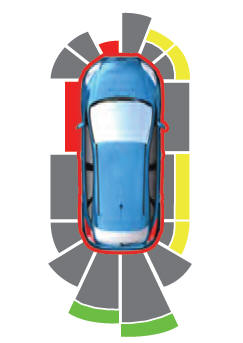
The system provides object distance indication through the information and entertainment display.
As the distance to the object decreases, the indicator waves and the lines move toward the vehicle icon. If there is no object detected, the distance indicator lines are grey.
Copyright © 2026 www.linautilus.com